Blog

  • Why Did the Server Take My Credit Card? U.S. Restaurant Payment Guide

    Why Did the Server Take My Credit Card? U.S. Restaurant Payment Guide

     Information checked November 5, 2026. Restaurant payment procedures, receipt formats, tipping screens, and QR systems vary. Follow the instructions at the restaurant you are visiting.

    Newcomer placing a payment card in a restaurant check presenter while a server approaches
    At many full-service U.S. restaurants, the customer places a card in the check presenter and the server processes it at another terminal.


    I was surprised the first time a U.S. restaurant server took my credit card away from the table. I also was not sure what to do when the check arrived. Was I supposed to place the card in the small pocket of the check presenter, hand it to the server, or wait until someone returned?

    When the card came back with multiple receipt slips, the process was still unfamiliar. I did not know which receipt to write on, which one to keep, or how the restaurant would charge the tip that I wrote after the card had already been processed.

    I have also seen portable table terminals and QR-code payments. Those systems created different questions: Do I pay on the device without giving up the card? Is the QR page legitimate? And at a restaurant that asks for payment and a tip before service, how do I choose a tip for service I have not received yet?

    Quick answer: At many full-service U.S. restaurants, the server brings a check presenter, takes the card to a fixed terminal, and returns the card with receipt copies. You normally complete the tip, total, and signature lines on the restaurant’s copy when provided, leave that copy, and keep the customer copy. Other restaurants use a portable terminal, counter payment, or a verified QR page, so check the exact instructions rather than assuming every restaurant follows one sequence.

    The traditional check-presenter sequence

    1. Ask for the check. A common phrase is, “Could we get the check, please?”
    2. Review the itemized bill. Check the food, drinks, tax, service charge, and any included gratuity before providing a card.
    3. Place the card in the presenter. Many presenters have a pocket or edge that lets part of the card remain visible. If there is no obvious place, laying the card securely inside is usually enough.
    4. Make the presenter visible. Closing it and placing it near the table edge often signals that payment is ready. You may also hand it to the server when they return.
    5. The server processes the card. The restaurant requests authorization for the check amount using its payment terminal.
    6. Check that your card returned. Confirm that it is your own card before putting it away.
    7. Complete the restaurant copy. If the receipt provides tip, total, and signature lines, enter the voluntary tip, calculate the final total, and sign as requested.
    8. Keep the customer copy. Take the copy labeled for the customer, or ask which copy to keep if the labels are unclear.

    You generally do not need to wait for the restaurant to run the card again after writing the tip. Visa’s restaurant-payment guidance describes a workflow in which the meal amount is authorized first and the customer-approved tip is included later in the final settlement. The card does not need to remain at the restaurant for that final processing step.
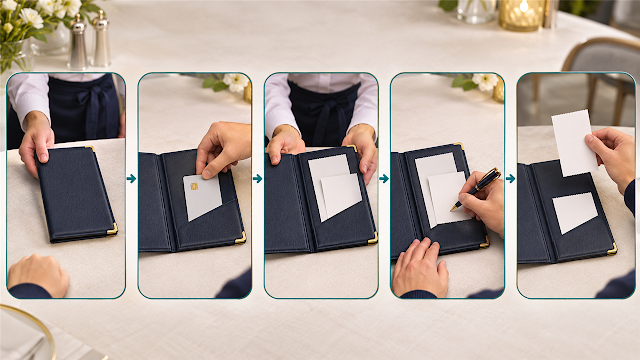
    Five-step restaurant payment sequence showing the check presenter, payment card, returned receipts, written total, and customer copy
    Review the check, provide the card, confirm its return, complete the restaurant copy, and keep the customer copy.

    Where exactly should the card go?

    Check presenters are not all designed the same way. Some have a visible card slot along the edge. Others open like a folder and have an inside pocket. Some are simply trays with no pocket at all.

    The purpose is not to solve a puzzle or hide the entire card. Place the card securely where the server can see that payment is ready. If you are uncertain, saying “Can I give you my card?” is completely clear. Do not leave a card loosely where it can fall under the table or be mixed with another guest’s belongings.

    Why does the server take the card away?

    Many U.S. full-service restaurants historically installed their card terminal at a server station rather than bringing a terminal to every table. The server therefore carries the card to that terminal, obtains authorization, and returns it with the receipts.

    This can feel unsafe to someone accustomed to keeping the card in sight. The workflow itself is not proof of fraud, but normal card precautions still apply:

    • use a card with transaction alerts if available;
    • do not write a PIN, security code, or full card number on a receipt;
    • confirm that the returned card is yours;
    • keep the customer receipt until the final transaction posts; and
    • review the final card amount and promptly report an unfamiliar transaction through the issuer’s verified contact channel.

    Visa’s consumer security guidance specifically advises checking the purchase amount before signing and making sure you receive your own card back after payment.

    Which receipt should you write on and keep?

    Receipt or document What it is for What the customer normally does
    Itemized check Lists ordered items, subtotal, tax, fees, and included charges. Review it before handing over the card.
    Merchant or restaurant copy Records the customer-approved tip, final total, and signature when those lines are used. Complete it clearly and leave it for the restaurant.
    Customer copy Provides the customer’s record of the transaction. Write the same final amount on it for your records if useful, then take it.
    Digital receipt May be sent by email, text, app, or QR payment page. Confirm the address or number before submitting and save the receipt securely.

    Labels and receipt counts vary. Some restaurants produce two card slips plus the original itemized check; others provide only one paper receipt or a digital receipt. If neither slip clearly says Merchant Copy or Customer Copy, ask the server instead of guessing.

    How to fill out tip and total lines

    First check whether the itemized bill already contains a service charge or automatic gratuity. Then, if you choose a voluntary card tip, write the tip amount and add it to the authorized check amount to calculate the total.

    For a fictional example:

    • Authorized restaurant check: $50.00
    • Voluntary tip selected by the customer: $10.00
    • Total written by the customer: $60.00

    Write legibly and make the arithmetic unambiguous. If you leave a cash tip instead, follow the restaurant’s instructions and make sure the card receipt does not accidentally authorize a second tip. Our guide to U.S. tip screens and service charges explains when a tip is voluntary and why an included charge should be reviewed first.

    Why might the pending and final card amounts differ?

    The first authorization may reflect the check before the written tip. After the restaurant submits the completed transaction, the final posted amount can include the customer-approved tip. A banking app may therefore show the original pending amount before it displays the final total.

    Compare the posted transaction with the total you approved rather than relying only on the first pending amount. Our guide to pending transactions and available credit explains the difference between authorization and final posting.

    How does a portable table terminal work?

    With a portable terminal, the server brings the device to the table. The customer can usually review the amount, choose a tip, tap or insert the card, and request a paper or digital receipt without the card leaving the table.

    1. Confirm that the device shows the correct check or table.
    2. Check for an included service charge before selecting another tip.
    3. Review all tip choices, including Custom or No Tip when applicable.
    4. Verify the final total before tapping or inserting the card.
    5. Wait for approval and ask for a receipt.

    Because the tip can be chosen before authorization, the terminal may request approval for the exact final amount rather than adjusting it afterward. The restaurant’s system determines the sequence.

    How should you use a restaurant QR code?

    A restaurant may place a QR code on the table, menu, or printed check so customers can open the bill and pay on a phone. Before entering card information:

    • inspect the printed code for a sticker placed over another code;
    • preview the destination address before opening it;
    • check that the domain belongs to the restaurant or its named payment provider;
    • confirm the restaurant, table, items, and total shown on the page;
    • avoid installing an unexpected app or entering unrelated account credentials; and
    • ask the server for another payment method if anything looks inconsistent.

    The FTC warns that fraudulent QR codes can lead to fake sites designed to steal payment or personal information. A familiar-looking design is not enough; verify the destination and transaction details.

    What about paying and tipping before service?

    Counter-service and some QR systems ask for payment and a tip before the food or table service is completed. That felt strange to me because I had not yet received the service I was being asked to evaluate.

    A preset prompt does not remove the customer’s choice. Consider what service has already occurred, read all options, and use Custom or No Tip when appropriate. If the restaurant has already added a mandatory service charge, review that charge before adding anything else. The previous tipping guide covers this decision in detail.

    A quick decision table

    Payment setup What you do What to verify
    Check presenter Review bill, provide card, complete the restaurant copy, and keep the customer copy. Your card returned, included charges, written tip, final total, and signature.
    Portable terminal Review, choose tip, and pay while the device remains at the table. Correct check, tip choice, exact final total, approval, and receipt.
    QR payment Scan, verify the destination, open the correct check, and pay by phone. Legitimate domain, table and items, included fees, final total, and confirmation.
    Counter prepayment Order, choose any voluntary tip, and pay before receiving the meal. Service type, optional choices, included charge, and final total.

    What I would do differently now

    When a check presenter arrives, I would first review the bill and place the card securely in the visible pocket or inside the folder. I would keep track of the card, confirm it is mine when it returns, complete the restaurant copy clearly, and take the customer copy.

    If the restaurant uses a table terminal or QR code, I would treat it as a different workflow rather than looking for paper receipt copies. I would verify the bill, included charges, tip choice, final total, and payment confirmation before leaving.

    Frequently asked questions

    Is it normal for a U.S. restaurant server to take my card?

    It remains a common workflow at full-service restaurants with a fixed server-station terminal. Other restaurants use portable terminals, counter payment, or QR payment instead.

    Do I put the card inside the check presenter?

    Use the visible slot or inside pocket if one is provided. Otherwise, place it securely inside or hand it to the server. The goal is simply to signal that payment is ready without letting the card fall.

    Which receipt do I leave?

    Normally, complete and leave the restaurant or merchant copy and keep the customer copy. If the slips are not labeled or the restaurant uses a different system, ask the server.

    Can I leave after writing the tip and total?

    In the traditional paper workflow, you normally may leave after completing the requested lines, taking your card and customer copy, and leaving the restaurant copy. Make sure the transaction and any required signature are complete.

    Is a QR code safer than giving the server my card?

    Each method has different risks. A QR payment keeps the physical card with you but can lead to a fake website if the code has been replaced. Verify the destination, while also following ordinary card and receipt precautions.

    Sources and further reading

    This article provides general educational information, not legal or financial advice. Restaurant procedures, card-network processing, receipt requirements, tip practices, and QR systems can change. Follow the restaurant’s current instructions and contact the card issuer through a verified channel when a transaction is unfamiliar or incorrect.

  • Do You Have to Tip When the Screen Asks? U.S. Tipping Guide

    Do You Have to Tip When the Screen Asks? U.S. Tipping Guide

     Information checked November 4, 2026. Tipping customs, restaurant policies, service charges, and local disclosure rules vary. This guide explains common decision points rather than imposing one percentage on every situation.

    Newcomer considering a tip prompt on a payment terminal at a U.S. cafe counter
    A tip screen can feel personal when an employee is waiting, but the screen itself does not explain the type of service or whether a charge is already included.


    The first time a payment terminal suddenly showed tip percentages, I was caught off guard. The amounts and percentages were already arranged on the screen, and choosing while an employee stood in front of me felt uncomfortable.

    I was also unsure what to do at takeout counters, fast-food restaurants, and cafes. If I ordered at the counter, carried my own food, and received no table service, was I still expected to tip simply because the terminal asked? I did not know where tipping was customary or how much was appropriate.

    Another time, I saw a line containing the word service on a receipt and nearly added another tip because I did not realize that a charge might already have been included. That experience taught me to read the bill before responding to the screen.

    Quick answer: A tip prompt does not by itself tell you that a tip is legally required or customary for that transaction. First identify the service: full table service is commonly tipped, while counter service, fast food, and ordinary takeout are more discretionary. Then check the bill for a service charge or automatic gratuity before adding anything.

    Why does the terminal show fixed percentages?

    A business can configure its payment system to display suggested percentages or dollar amounts. Those buttons make the calculation faster, but their size, order, and default choices are not a universal U.S. rule.

    The IRS explains that suggested calculations can still represent a voluntary tip when the customer may choose any amount or leave the tip blank. A required digital prompt that does not permit a zero tip is treated differently for federal tax purposes. In practical terms, look for options such as No Tip, Skip, or Custom rather than assuming that the largest visible buttons are the only choices.

    Take enough time to read the screen. An employee’s presence does not change the transaction into a mandatory charge. If the choices are unclear, ask, “Is this optional?” or request a printed bill before approving the total.

    Start with the type of service, not the screen

    Situation What service occurred? A useful way to decide
    Full table service A server takes the order, brings food, checks the table, and handles the bill. Tipping is a strong U.S. custom. Many current guides use roughly 15%–20% as a reference range, but first check for an included charge.
    Counter-service cafe You order and pay at the counter; service may range from handing over one item to preparing a customized order. A terminal prompt is common, but an additional tip is generally discretionary. Consider the actual service rather than feeling controlled by preset buttons.
    Fast food or self-service You order at a counter or kiosk, collect the food, and often clear the table yourself. Traditional guidance does not treat a screen alone as creating the same expectation as full table service.
    Ordinary takeout The restaurant prepares and packages an order that you pick up. A tip is more discretionary than at a served table. Some customers choose one for a large, complicated, or especially helpful order.
    Delivery A worker transports the order to your location. This is a separate service from counter pickup. Check delivery fees and the app’s explanation because a fee is not automatically the worker’s tip.

    The range above is a practical description of common custom, not a federal tipping law. Visit The USA describes 15%–20% as a general restaurant reference, while survey and etiquette sources show that practices vary by service type. Local norms and the actual service still matter.

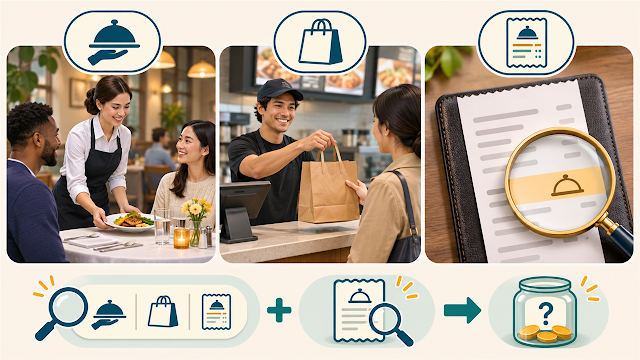
    Comparison showing table service, counter takeout, and checking a receipt for an included charge before tipping
    Identify the service and inspect the bill before responding to a suggested tip screen.

    What should you do at a cafe or takeout counter?

    A counter terminal may use the same software whether you received extensive help or simply picked up an item. The appearance of the prompt therefore does not settle the etiquette question.

    1. Identify what the employee did. Was this a simple handoff, a customized order, a large order, or service beyond the ordinary transaction?
    2. Read every choice. Look for No Tip, Skip, Custom, or another way to set the amount yourself.
    3. Choose intentionally. A voluntary tip may be zero or another amount you select. Do not press a preset percentage merely to end an awkward moment.
    4. Confirm the total. Make sure the tip you chose is the amount added before approving payment.

    At a fast-food restaurant or a cafe where you order at the counter and receive no table service, you do not need to pretend that the screen is a waiter standing beside your table. You can still tip when you appreciate the service, but the choice should be deliberate.

    Tip, suggested tip, service charge, and automatic gratuity are different

    Term What it generally means What to check
    Voluntary tip The customer chooses whether to pay it and determines the amount. You should be able to choose zero, another amount, or leave a voluntary line blank.
    Suggested tip The receipt or terminal calculates examples for convenience. A suggestion remains voluntary when you retain control of the amount.
    Service charge A business-required amount added to the bill under its policy. Ask what it covers and whether any additional tip is expected; distribution to workers may not be what you assume.
    Automatic gratuity A mandatory amount, often used for specified groups or services. For federal tax treatment, the IRS considers a compulsory auto-gratuity a service charge rather than a voluntary tip.
    Delivery or other fee A separately named business charge. Do not assume from the word fee that it is paid directly to the worker as a tip.

    The IRS says a payment is a tip when the customer voluntarily decides to pay it and determines the amount. It separately describes mandatory service charges and automatic charges as service charges rather than tips for federal tax purposes. The Department of Labor also distinguishes compulsory service charges from tips.

    How to avoid adding a second tip by mistake

    1. Read the menu, reservation notice, order page, and receipt for service charge, automatic gratuity, included gratuity, large-party charge, or similar wording.
    2. Check whether the charge is calculated as a percentage or flat amount.
    3. Ask the restaurant what the charge covers and whether an additional tip is optional.
    4. Do not assume that a blank tip line proves no charge was already included.
    5. Review the final total on the terminal before tapping or inserting the card.

    Our guide to reading a U.S. receipt explains how to separate subtotal, tax, fees, adjustments, and the final amount. Receipt labels are not perfectly standardized, so ask the business when a line is unclear.

    Do not rely only on the word “gratuity”: Whether a payment is voluntary or compulsory matters. Read the policy and ask before adding another amount when the bill already contains a service-related charge.

    How to calculate a voluntary percentage

    If you decide to use a percentage, multiply the amount you are using as the base by the chosen rate. Many etiquette guides calculate restaurant tips from the pre-tax food-and-beverage subtotal, but practices vary and a terminal may calculate its suggestions differently.

    For a fictional pre-tax subtotal of $40:

    • 15% is $6.00 because $40 × 0.15 = $6.00.
    • 18% is $7.20 because $40 × 0.18 = $7.20.
    • 20% is $8.00 because $40 × 0.20 = $8.00.

    These examples teach the math; they do not command a percentage for every transaction. Check which subtotal the terminal used and whether an included charge has already changed the bill.

    Why the posted card amount may change after a restaurant visit

    At some restaurants, the card may first be authorized for the meal amount and later finalized with the tip the customer approved. That can make a banking app show a pending amount that differs from the final posted amount.

    Full-service restaurants may also use a paper workflow in which the server takes the card, returns two receipt copies, and the customer writes the tip afterward. Our guide to paying by card at a U.S. restaurant table explains each step and which receipt to keep.

    This does not authorize a restaurant to invent a tip. Keep the signed or digital receipt and compare it with the final transaction. Our guide to pending card charges and available credit explains why a temporary authorization and final posted amount may appear at different times.

    What I would do differently now

    I would no longer treat preset percentages as a test with one correct answer. I would first ask whether I received table service, counter service, takeout, or delivery. Then I would read the receipt for an included charge and decide whether any additional amount was voluntary.

    If an employee turned the screen toward me, I would pause long enough to find all the choices. I would not select a percentage only because someone could see the screen. If the wording or final total was unclear, I would ask before approving the payment.

    Frequently asked questions

    Do I have to tip because the terminal asks?

    Not merely because a prompt appears. Determine whether the payment is voluntary, what service occurred, and whether the bill already includes a mandatory charge.

    Is it rude to choose No Tip at a counter?

    A counter prompt does not create the same service situation as a full-service restaurant. Customs differ, but you should make an intentional choice based on the service rather than assume every preset button is compulsory.

    Should I tip at a fast-food restaurant?

    Traditional U.S. guidance does not treat ordinary fast food or self-service like full table service. Some terminals still offer an optional tip. Read the screen and choose according to the actual service.

    Does a service charge go directly to my server?

    Do not assume it does. A compulsory service charge belongs to the business for federal wage-and-tax treatment, although the business may distribute some or all of it to workers. Ask the restaurant what its charge covers.

    If gratuity is already included, should I add another tip?

    An additional voluntary tip is your decision unless the business clearly discloses another requirement. Confirm what the included charge is before adding a second amount.

    Sources and further reading

    This article provides general educational information, not legal, tax, employment, or financial advice. Tipping customs and required disclosures can vary by location and business. Read the current menu, receipt, terminal, and restaurant policy before approving payment.

  • Why Did the Gas Station Put a Hold on My Card? U.S. Pump Guide

    Why Did the Gas Station Put a Hold on My Card? U.S. Pump Guide

     Information checked November 3, 2026. Gas-station procedures, authorization amounts, card acceptance, and release times vary by merchant and card issuer.

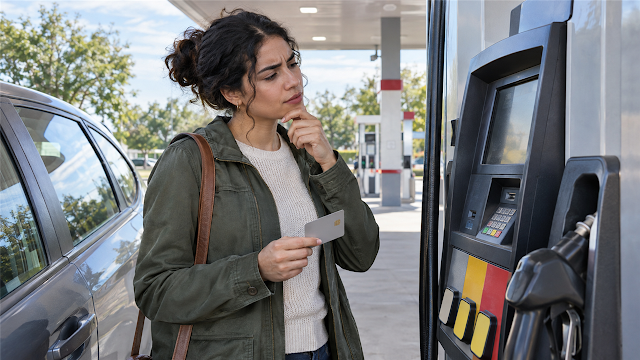
    Newcomer holding a payment card and looking at a card terminal at a U.S. gas pump
    Paying at the pump can involve a temporary authorization before the exact fuel total is known.


    Paying for gas in the United States was more confusing than I expected. At one pump, a card asked for a ZIP code and I did not know which number it wanted. I have also heard that some cards need to be used inside, and I have visited stations where prepaying at the cashier was the only available option.

    I usually use a debit card for gas, although I sometimes use a credit card. I do not remember seeing a large temporary gas-station amount in my banking app, so I cannot claim that a specific hold happened to my account. I have, however, used the membership-card step at Costco gas. Learning how authorization works explains why a pump, cashier, and banking app may show different steps.

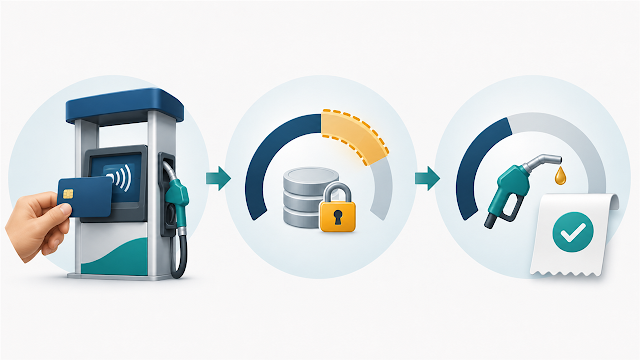
    Quick answer: A pump may ask the card issuer to reserve an estimated amount before you begin because the station does not yet know how much fuel you will buy. After fueling, the merchant sends the actual purchase total. The temporary authorization should be released or replaced, but the timing and display depend on the merchant and issuer.
    Three-step diagram showing a card authorization at a gas pump, temporarily reserved funds, and the final fuel purchase
    The pump first requests authorization, temporarily reserves funds or credit, and then sends the actual fuel total.

    Why does a gas pump authorize the card before fueling?

    At a store register, the merchant normally knows the purchase total before requesting card approval. At a gas pump, the card is checked before the driver starts fueling. The station therefore needs a way to confirm that the account can pay for fuel that has not yet been dispensed.

    The first amount is an authorization, often called a hold or preauthorization. It reserves some available money or credit while the transaction is unfinished. The second step is the completion or final charge based on the fuel actually purchased.

    Here is a fictional example for explanation only:

    Stage What may happen What it means
    Before fueling The pump requests a temporary $100 authorization. This fictional amount is not yet the known fuel total.
    After fueling The driver buys $42 of fuel. The station sends the actual $42 transaction.
    After processing The temporary authorization is released or replaced, and $42 posts. It should not become a permanent $142 purchase.

    The example does not predict what any station will authorize. The amount, app display, and release timing can differ by merchant, network, account type, and issuer.

    Is the hold a second charge?

    A normal authorization hold is not supposed to become a second permanent fuel purchase. During processing, however, an app may show a temporary amount, a pending fuel charge, or a lower available balance before the final transaction settles. That can make the account look as if more money was taken than the receipt shows.

    Compare the final posted transaction with the receipt rather than treating every pending amount as final. If an unfamiliar amount remains, the same fuel purchase posts twice, or the final charge does not match the receipt, contact the station and the card issuer using verified contact information.

    Debit card versus credit card at the pump

    Payment method What a hold may affect Practical check
    Debit card Available funds in the linked checking or card account Leave enough room for the authorization and other scheduled expenses.
    Credit card Available credit on the card rather than the checking-account balance A hold can still matter when the credit limit is small.
    Cash or inside prepayment The amount given or authorized at the register Ask what happens if you pump less than the prepaid amount.

    A credit card is not automatically the right choice for everyone, and a debit card is not automatically unsafe. The important difference is where the temporary reservation appears. With debit, it can reduce money available for groceries, rent, or other payments. With credit, it can reduce the remaining credit line. Check the account terms and use the method that fits your available funds, credit limit, and budgeting needs.

    Our guide to pending charges and available credit explains why a temporary authorization may change one number in a card app before the posted balance changes.

    Why does the pump ask for a ZIP code?

    The ZIP prompt is usually an address-verification step. It generally wants the billing ZIP code held by the card issuer, not the gas station’s ZIP code or the ZIP code of a temporary place where the traveler is staying.

    This was especially confusing with a card issued outside the United States because I did not have a matching five-digit U.S. billing ZIP code. Guessing a local ZIP code does not change the billing address stored by the issuer. If the pump does not support the card’s address format, cancel the transaction cleanly and ask the cashier what payment options that station accepts.

    For the full foreign-card and mobile-wallet explanation, read why a foreign credit card may not work in the United States.

    When paying inside may help

    Some stations or cards direct customers to the cashier, and some pumps may be unavailable for outside card payment. Paying inside can also help when the automated ZIP-code step fails or when a debit-card user wants to control the authorized amount more closely.

    1. Note the pump number before entering the store.
    2. Tell the cashier the pump number and the amount you want to prepay.
    3. Ask whether unused prepaid money is adjusted automatically or requires returning to the cashier, especially when paying cash.
    4. Fuel only after the cashier confirms that the pump is ready.
    5. Keep the receipt and compare it with the final posted transaction.

    U.S. Bank explains that an inside prepayment may still begin as an authorization for the chosen amount. If less fuel is used, the final transaction should reflect the amount actually pumped, although the earlier authorization may remain visible until processing finishes. Procedures and timing are not identical at every station.

    How the Costco gas step fits in

    At Costco gas, I have used the membership-card step before payment. The membership check and the payment authorization are separate ideas: the first confirms access to the member fuel station, while the second asks the card issuer to approve the fuel transaction.

    Costco’s published U.S. FAQ says that when fuel is purchased with a PIN debit card or Visa card, Costco requests a preauthorization before fueling. Costco says the issuer-approved amount may be up to $150, then Costco immediately sends the actual purchase amount after fuel is dispensed. Costco also says the card issuer is responsible for removing the preauthorization. This is Costco’s stated process, not a universal amount for every gas station.

    What to do when the amount looks wrong

    1. Save the fuel receipt. It shows the amount actually dispensed.
    2. Separate pending from posted. A pending authorization is not necessarily the final charge.
    3. Check available funds or credit. A hold may affect these before it affects the posted balance.
    4. Read the issuer’s timing. The station can send the completion, but the issuer controls how the account displays and releases the reservation.
    5. Contact the station about the purchase. Ask about the final fuel amount or an incorrect merchant transaction.
    6. Contact the issuer about the account. Ask about an unexplained hold, release timing, decline, or unfamiliar charge.
    Act quickly on an unfamiliar transaction: Do not assume that every gas-station charge is a harmless hold. If you do not recognize the station or purchase, use the number on the back of the card or the issuer’s verified app or website to report it.

    What I understand differently now

    I used to treat the pump screen, the cashier’s instructions, and the card transaction as one step. Now I separate them: membership access when required, card verification, temporary authorization, fueling, and the final posted amount.

    Because I usually use a debit card, I would pay closer attention to the money available in the account before a long drive. If a pump rejected the card, required a ZIP code I could not provide, or instructed me to pay inside, I would stop guessing and ask the cashier. I would also keep the receipt until the final amount appeared correctly.

    Frequently asked questions

    Why is the gas-station amount larger than what I pumped?

    You may be seeing a temporary authorization rather than the final fuel charge. Compare its status with the receipt and wait for the issuer’s published processing period. Contact the issuer if it remains unexplained.

    Will paying inside always prevent a hold?

    Not necessarily. Paying inside may let you choose the authorized amount and avoid an automated pump problem, but the merchant and issuer may still use an authorization while the transaction processes.

    Should I use debit or credit at the pump?

    There is no single answer for every account. A debit authorization can reduce available bank funds, while a credit authorization can reduce available credit. Consider your balance, credit limit, card terms, and the station’s instructions.

    What if the pump asks for a ZIP code that my foreign card does not have?

    Do not invent a U.S. billing ZIP code. Cancel the pump attempt and ask the cashier whether the card can be processed inside or whether another accepted payment method is needed.

    Why does Costco ask for a membership card before payment?

    The membership card verifies access to the member gas station. The payment card then goes through its own authorization process. Follow the instructions shown at that location because equipment and accepted payment methods can change.

    Sources and further reading

    This article provides general educational information, not individualized financial advice. Merchant procedures, card-network rules, authorization amounts, account displays, release timing, accepted cards, and membership requirements can change. Follow the current instructions from the station and card issuer.

  • Why Did My Available Credit Drop? Pending Charges Explained

    Why Did My Available Credit Drop? Pending Charges Explained

     Information checked November 2, 2026. Pending-transaction and payment-processing practices vary by card issuer, merchant, payment network, transaction type, and account history. Check your own issuer’s app, agreement, and customer-service guidance.

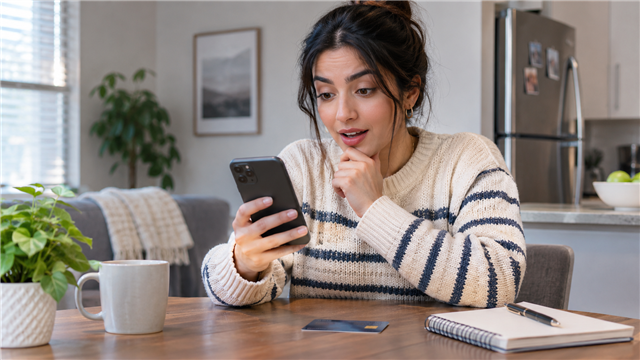
    New U.S. credit-card user checking a lower available-credit amount in a banking app
    A lower available-credit number does not always mean that a new charge has already posted to the account balance


    When I first used a U.S. credit card, I noticed that my available credit could suddenly become smaller. I eventually realized that pending purchases were probably reserving part of the credit line. What made the screen harder to understand was that the current balance did not always change at the same time.

    I was also surprised when a displayed amount became larger than I expected. At first, I wondered whether a large amount of sales tax had been added. Tax can make a final purchase total higher than a shelf price, but it is not the only explanation for a changing card amount. A merchant may first request a temporary authorization and later submit a different final amount.

    Quick answer: A pending purchase or temporary merchant hold can reduce available credit before it becomes part of the posted current balance. When the merchant completes the transaction, the pending amount normally disappears and the final charge posts. A recent card payment may increase available credit quickly, but an issuer can also wait to confirm the payment before restoring the credit line.

    Available credit is not the same as your current balance

    Your credit limit is the maximum credit line the issuer has currently provided. Your available credit is the portion that remains usable after the issuer accounts for posted balances, pending authorizations, holds, and any other applicable account adjustments.

    Your current balance generally reflects transactions that have posted, along with posted payments, credits, fees, and other account activity. A pending purchase may already reduce available credit even though it is not yet included in that posted balance. Exact labels and calculations vary by issuer, so the numbers may not fit a simple subtraction at every moment.

    App term What it usually tells you Important limitation
    Credit limit The maximum line currently assigned to the account It is not extra income or a recommended spending amount.
    Available credit How much of the line the issuer currently shows as usable Pending charges and holds may reduce it before they join the posted balance.
    Current balance The live total of activity that has posted to the account It is not necessarily the amount required to satisfy the last statement.
    Statement balance The balance recorded when the completed billing cycle closed Later purchases may appear in the current balance but not this closed-cycle amount.

    For a complete explanation of the monthly bill and payment choices, use our U.S. credit-card statement guide. This article focuses on what happens before a purchase or payment finishes processing.

    How a pending charge can lower available credit first

    When you make a card purchase, the merchant normally asks the issuer to authorize it. The issuer checks whether the account is valid and whether enough credit is available. If the transaction is approved, the issuer may reserve that amount while the merchant finishes processing it.

    Capital One explains that a pending authorization places a hold on available credit until it processes. Chase similarly notes that a pending amount will likely be subtracted from available credit even though it has not yet been added to the account balance. These are issuer explanations, not promises that every card app displays transactions in exactly the same way.

    Consider a fictional card with a $1,000 limit:

    Account activity Current balance Pending activity Available credit
    Before a new purchase $200 posted $0 About $800
    After a $75 authorization May still show $200 $75 pending May fall to about $725
    After the $75 posts About $275 $0 for that purchase About $725

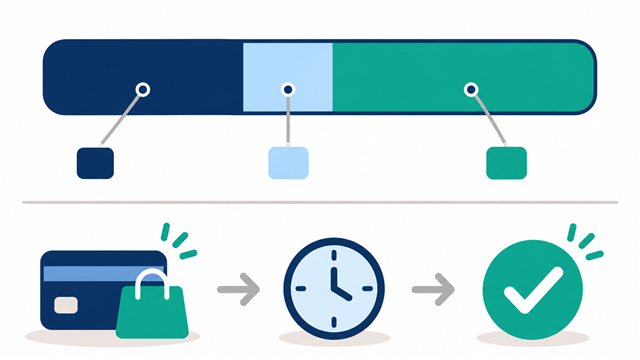
    The $75 should not permanently count twice. It moves from pending activity to posted activity after the merchant completes the transaction. During processing, however, the app can look confusing because the available-credit calculation has already changed while the displayed current balance has not.

    Diagram showing posted purchases, a pending authorization, remaining available credit, and the path from purchase to posting
    A pending authorization can reserve part of the credit line before the final purchase becomes a posted balance.

    Why the pending amount may differ from the final charge

    A pending amount is not always the merchant’s final request. The merchant may not yet know the exact total, or the transaction may require an adjustment before settlement.

    • Restaurants: an initial authorization may be adjusted when the merchant includes the tip.
    • Gas stations: paying at the pump can begin with a temporary authorization before the exact fuel total is known.
    • Hotels and rental cars: the merchant may authorize an estimated amount that includes room, rental, deposit, or incidental coverage.
    • Online orders: a merchant may wait to finalize the charge until an item ships, or may process parts of an order separately.
    • Canceled purchases: an authorization can remain visible temporarily even when it later disappears without becoming a final charge.
    • Restaurant transactions can be especially confusing when a tip is added after the first card authorization. Our guide to U.S. tip screens, suggested percentages, and service charges explains what to review before approving the final amount.

      Gas pumps are a common place to see this sequence. Our guide to gas-station card holds and paying at the pump explains preauthorization, debit versus credit, inside prepayment, ZIP prompts, and the Costco membership step.

    Capital One identifies restaurant tips, fuel-pump authorization amounts, and hotel or rental-car incidental estimates as reasons a pending amount may change. The safest response is not to guess that every increase is tax. Compare the final receipt with the posted transaction after processing finishes.

    If the confusion began because a store’s displayed price was lower than the checkout total, read our guide to why U.S. checkout prices can be higher than expected. That guide explains sales tax and other checkout conditions; a card authorization hold is a different stage of the payment process.

    Why available credit may not return immediately after a payment

    I have made a payment and waited because the account did not appear to update immediately. At other times, the available-credit number increased quickly enough that I thought I could use the card again. Both experiences can occur, but an early increase should not be treated as a universal promise that every payment has fully cleared.

    Bank of America’s current payment FAQ says account balances and funds availability can take up to two bank business days to update. Capital One describes a payment hold as a period in which the issuer confirms a payment from the linked bank account before restoring available credit; its published example says such a hold can sometimes last several days. Your issuer’s timing may be different.

    A card payment has at least two timing questions:

    1. Was the payment received on time? This matters for the due date and potential late-payment consequences.
    2. Has the issuer restored the credit line? This determines how much the app currently shows as available for another purchase.

    Those events may not occur at the same moment. Do not submit a duplicate payment merely because the available-credit number has not yet changed. First review the payment status and confirmation, then follow the issuer’s stated processing timeline.

    What to check when the numbers look wrong

    1. Confirm the account. Make sure you are looking at the correct card, especially if two cards appear in the same banking app.
    2. Separate pending from posted activity. Add the pending authorizations and compare them with the change in available credit.
    3. Open the transaction details. Look for the merchant name, date, status, and any explanation of a temporary hold.
    4. Save the receipt or order confirmation. Use it to compare the expected final total after the transaction posts.
    5. Check recent payment status. Verify whether it is scheduled, processing, completed, returned, or subject to a hold.
    6. Allow the published processing period. Weekends, holidays, merchant timing, and issuer procedures can affect posting.
    7. Contact the right party. Ask the merchant about an expected authorization or incorrect final amount; ask the issuer about the account display, an unexplained hold, or an unfamiliar transaction.
    Do not wait on suspected fraud: A normal authorized purchase may need to post before the issuer can process an ordinary billing dispute, but an unrecognized transaction may require immediate fraud reporting. Use the number on the back of the card or the issuer’s verified app or website.

    A safer habit for a small first credit limit

    Pending authorizations matter more when the credit limit is small. A $150 hold uses 30 percent of a $500 limit but only 3 percent of a $5,000 limit. The hold is the same dollar amount, yet the first cardholder loses a much larger share of usable credit.

    Our guide to managing a first $500 credit limit explains why a small starting line requires extra room for pending purchases and why carrying a balance is not necessary for building credit.

    • Treat an authorized pending purchase as already spent.
    • Leave room for tips, deposits, or estimated authorizations when applicable.
    • Do not rely on a payment to restore credit instantly.
    • Keep a backup payment method for essential purchases.
    • Pay according to the statement balance and due date, not merely because the card is close to its limit.

    What I understand differently now

    When available credit first dropped, I treated the mismatch as if one of the numbers had to be wrong. I now read the screen in a sequence: credit limit, posted current balance, pending transactions, recent payments, and then available credit.

    I would also avoid explaining every larger amount as sales tax. I would first ask whether I was viewing an estimated authorization, a tip adjustment, a merchant hold, or a final posted charge. Then I would compare the posted amount with the receipt rather than assuming the pending screen was the final bill.

    Frequently asked questions

    Why did my available credit decrease when my balance did not change?

    A pending authorization may have reserved part of your credit line before the purchase joined the posted current balance. Open the pending-transaction list and review the issuer’s calculation.

    Will a pending charge be added twice?

    A normal transaction should move from pending to posted rather than remain as two permanent charges. The displays can briefly look confusing during processing. If both amounts remain after the expected timeframe or the final total is wrong, contact the merchant and issuer.

    Why is the final restaurant, gas-station, or hotel charge different?

    The first amount may have been an estimate or authorization. A tip, actual fuel total, incidental amount, deposit adjustment, or other finalized charge can change the posted amount. Compare it with the receipt and merchant terms.

    Does paying my card immediately restore available credit?

    Sometimes the app updates quickly, but not always. The issuer may wait for the payment to process or clear before restoring the line. Check the payment status and the issuer’s published timing instead of depending on immediate availability.

    Should I make another payment if the first one is still processing?

    Not automatically. Confirm that the first payment was scheduled or received, verify the source account, and follow the issuer’s instructions. An unnecessary duplicate payment can create a different cash-flow problem.

    Sources and further reading

    This article provides general educational information, not individualized financial or legal advice. Card terms, holds, processing times, and dispute procedures vary. Verify instructions with your own card issuer and merchant.

  • What Does “Cash Back” Mean at Checkout in the U.S.?

    What Does “Cash Back” Mean at Checkout in the U.S.?

     Information checked October 29, 2026. Cash-back availability, eligible cards, withdrawal limits, denominations, and fees vary by retailer, location, card, and payment network.

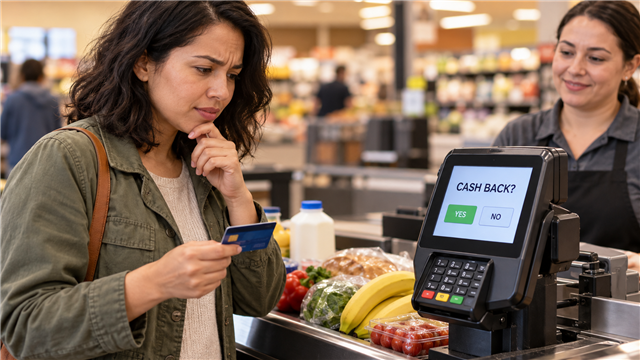
    Newcomer looking at a U.S. payment terminal that asks Cash Back at a grocery checkout
    At many U.S. registers, “Cash Back?” asks whether you want to withdraw physical cash as part of an eligible card purchase.


    The first time a U.S. payment terminal asked me, “Cash Back?”, I was confused. I wondered whether the store was asking if I had joined a separate membership program. I also thought it might mean a discount or card reward, so I assumed I was not eligible.

    I later learned that the screen was asking a much simpler question: did I want the cashier to give me physical cash while I paid for my purchase? I believe I was using a debit card. Since then, I have occasionally used the option when I needed cash.

    What the screen is really asking: “Cash Back?” at a checkout usually means, “Would you like to add a cash withdrawal to this eligible debit- or prepaid-card purchase?” It is not free money, a store discount, or a membership question.

    A simple cash-back example

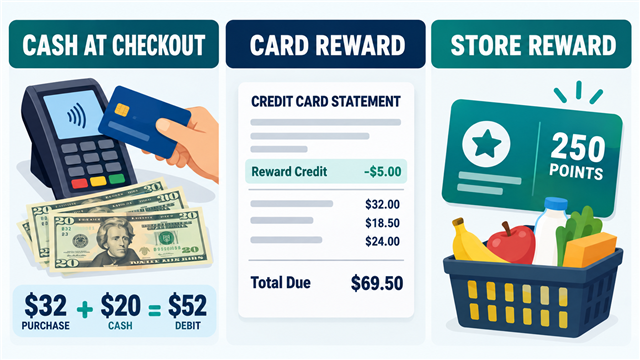
    Suppose your groceries cost $32 and you select $20 cash back. The card transaction becomes $52, and the cashier gives you $20 in bills. The $20 comes from the money available in your account; the store is not giving you a $20 reward.

    Part of the transaction Example What it means
    Purchase $32 The items you bought
    Cash back $20 Physical cash you receive at the register
    Total debit $52 The amount taken from the linked account, before any disclosed fee

    Make sure the purchase amount, requested cash, any fee, and final debit make sense before approving the transaction. The cash amount may also appear separately on the receipt.

    Comparison of cash at checkout, a credit-card cash-back reward, and a store loyalty reward
    The same words can describe three different things, so use the screen and transaction context to identify which one applies.

    Why a PIN and debit card may be involved

    The Consumer Financial Protection Bureau explains that consumers may obtain cash during a purchase at certain stores using a PIN-authenticated debit card or prepaid card. Some self-checkout registers also offer it. This fits my memory that I used a checking-account debit card.

    A debit card normally spends money from a bank or credit-union account. A prepaid card spends funds previously loaded to the card. A credit card, by contrast, generally borrows money that must be repaid. These differences matter because a register’s ordinary cash-back withdrawal option is not the same as borrowing a cash advance from a credit card.

    The exact screen sequence varies. You may be asked to choose debit, enter a PIN, answer “Yes” or “No” to cash back, and select a preset amount. Never assume every card or register supports the feature. If it is unclear, choose “No cash back” and ask the cashier before trying again.

    Cash at checkout is not a cash-back reward

    Term What happens Newcomer clue
    Cash at checkout Cash is added to an eligible purchase and handed to you. The terminal asks for an amount while you are paying.
    Card cash-back reward An issuer awards value based on eligible spending, often redeemable as a statement credit or deposit. You see an earn rate, rewards balance, or redemption option in the card account.
    Store reward A retailer’s loyalty program provides points, discounts, or offers under its rules. The cashier asks for a phone number, loyalty ID, or membership.

    This distinction explains my original misunderstanding. I thought the terminal might be asking about a membership or reward for which I did not qualify. In reality, it was offering access to money already in my account.

    Credit-card rewards can still be called “cash back,” but they work differently. The CFPB describes rewards that may be redeemed as statement credits or direct deposits. A statement credit can reduce a card balance, but it is not the same thing as selecting $20 at a grocery terminal and receiving a $20 bill.

    Check the store’s limit and fee before accepting

    Not every retailer offers cash back, and stores that do offer it may set different maximums, denominations, minimum purchases, or eligible payment methods. The CFPB reports that preset withdrawal choices are common and that some merchants charge cash-back fees.

    Read the payment screen before confirming. If a fee appears, compare the convenience with other ways to obtain cash. Do not assume the service is always free simply because you previously used it without a fee at another store.

    • Confirm the cash amount you selected.
    • Look for a separate service fee.
    • Make sure enough money is available in the linked account.
    • Check whether your bank or card agreement adds any relevant charge.
    • Keep the receipt until the transaction matches your account.

    What if the register does not offer cash back?

    I once missed a notice that a particular checkout stand did not support cash back and requested cash anyway. The cashier handled the situation by giving me money separately. That was one personal experience, not a procedure shoppers should expect at other stores.

    The safer rule is simple: use cash back only when the register officially offers it and the amount is shown as part of the transaction. If the terminal says the service is unavailable, cancel that request and use an approved register, an in-network ATM, a bank or credit-union branch, or another method supported by your account.

    Check the cash and receipt before leaving

    Count the cash discreetly at the register and confirm that it matches the amount selected. Then review the receipt. Our guide to reading a U.S. store receipt explains how to find the total, tender, payment details, and adjustments.

    If you selected cash back but received the wrong amount—or no cash—tell the cashier immediately before leaving. Keep the receipt and note the time, register, and amount. If the store cannot resolve a card-transaction problem, contact the bank or card issuer using the verified number in its app, on its website, or on the card.

    Do not describe an amount as unauthorized if you intentionally approved it. Explain precisely what happened: for example, “The receipt shows $20 cash back, but I did not receive the $20.” Accurate details help the store and issuer investigate the correct issue.

    Basic safety at the terminal

    • Cover the keypad when entering a PIN.
    • Pause if the terminal looks damaged, loose, or altered.
    • Do not let a stranger choose the amount for you.
    • Put away the cash and receipt before walking through the parking lot.
    • Turn on debit-card transaction alerts in your banking app.

    If you are opening your first account, our U.S. bank-account guide for newcomers explains checking accounts, debit cards, fees, and questions to ask. For card rewards and account credits, see how to read a U.S. credit-card statement.

    Frequently asked questions

    Is checkout cash back free money?

    No. The cash is added to the transaction and normally taken from funds available through the eligible debit or prepaid card. A retailer may also charge a disclosed fee.

    Do I need a store membership?

    Not necessarily. Cash-back withdrawal eligibility and loyalty membership are different issues. Follow the store’s payment-screen instructions and current policy.

    Can I use a credit card?

    Do not assume so. The ordinary retail cash-back option described here is commonly associated with eligible PIN debit or prepaid transactions. A credit-card cash advance is a different transaction and can carry separate fees and interest under the card agreement.

    Why does the screen offer only certain amounts?

    Retailers may use preset choices and limits based on their policies and available cash. Choose only an amount the terminal officially offers.

    The bottom line

    When a U.S. checkout screen asks “Cash Back?”, it is usually not asking whether you belong to a membership or earn a reward. It is asking whether you want to add a cash withdrawal to an eligible purchase. Read the total and any fee, confirm the amount, count the cash, and keep the receipt.

    Once I understood that distinction, the question stopped feeling mysterious. It became a useful option for the occasions when I needed physical cash—provided the register supported it and the full transaction was clear.

    Sources

    This article provides general educational information, not individualized financial advice. Confirm current fees, eligibility, limits, and dispute procedures with the retailer and your card issuer.

  • Why Your Foreign Credit Card May Not Work in the U.S.

    Why Your Foreign Credit Card May Not Work in the U.S.

     Information checked October 28, 2026. Card acceptance, address verification, foreign-transaction settings, temporary authorization holds, and mobile-wallet support vary by card issuer, merchant, payment network, device, country, and account. Confirm the current requirements with the merchant and the card issuer.

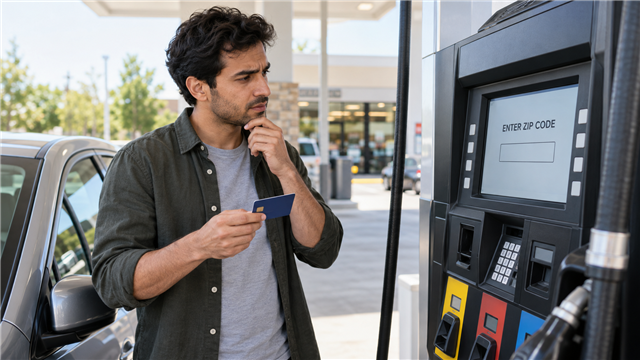
    Newcomer holding a foreign bank card while a U.S. gas pump asks for a ZIP code
    A foreign card may work in U.S. stores but still fail when a fuel pump requires a billing ZIP code.


    When we first arrived in the United States, we used credit and debit cards issued in Korea. The cards worked for ordinary purchases, and we were also able to use a Korean billing address for at least some online orders. The confusing moment came at a gas station.

    The fuel pump asked for a ZIP code. We did not know whether it wanted the ZIP code where we were staying, a code connected to the Korean card, or something else. We could not complete the payment and left without buying gas. That experience made us apply for U.S. cards soon after arriving.

    The lesson was not that foreign cards never work in America. Ours often did. The problem was that a card can be valid while one particular payment system cannot verify the address or complete the transaction.

    Start here: Do not guess a random ZIP code. Check whether the prompt wants the billing ZIP code attached to the card. If a foreign card has no compatible five-digit code, cancel the attempt and ask the cashier how to pay inside. For other failures, confirm the billing address, international-use setting, available funds or credit, and mobile-wallet eligibility with the issuer.

    Why can a foreign card work in one place and fail in another?

    A store, website, fuel pump, and mobile wallet do not perform exactly the same checks. One merchant may approve the card through its network, while another may require a billing-address match, reject an international billing address, place a temporary authorization hold, or use a payment method the issuer has not enabled.

    Where the card is used Possible extra check Practical response What not to assume
    Store terminal Issuer approval, card network, chip, tap, or PIN Try the physical chip and contact the issuer if declined One successful purchase guarantees acceptance everywhere
    U.S. fuel pump Five-digit billing ZIP code and temporary authorization Cancel and ask the cashier about paying inside The ZIP code of the station or hotel belongs to the card
    Online checkout Billing-address match and merchant country rules Enter the issuer’s exact billing address and check accepted countries Every U.S. website rejects foreign addresses
    Mobile wallet Supported bank and card, device security, region, and verification Read the exact error and check both issuer and device requirements A physical card that works must be eligible for every wallet

    What ZIP code does a U.S. gas pump want?

    When a pump asks for a ZIP code during card payment, it generally wants the postal code associated with the card’s billing address—not the ZIP code of the gas station, the place where you are staying, or a newly acquired U.S. mailing address that the issuer does not have on file.

    Visa’s guidance for U.S. fuel merchants discusses Address Verification Service checks at automated pumps. It tells merchants to provide a way for international cardholders to bypass an incompatible ZIP or postal-code prompt or to see the cashier. Visa also provides a special numeric conversion for Canadian postal codes. That Canadian method does not establish a code for Korean cards or every other foreign card.

    For our Korean cards, the honest answer is that we did not know a valid five-digit billing code to enter. Guessing the ZIP code where we were staying would not have changed the billing address stored by the Korean issuer.

    What to do when the pump will not accept the card

    1. Stop guessing. Repeated attempts with invented codes can still fail and may trigger a security response.
    2. Cancel the pump transaction. Make sure the screen returns to its starting state before walking away.
    3. Ask the cashier. Explain that the card was issued outside the United States and the pump requested a U.S. billing ZIP code.
    4. Follow the station’s prepayment process. The cashier may ask for a dollar amount before the pump is activated. Procedures vary.
    5. Check the account afterward. Look for a pending authorization and confirm that the final fuel amount replaces or follows the temporary amount correctly.

    A pending amount is not always the final charge. Automated fuel dispensers may request an authorization before the exact purchase amount is known. The amount and release timing depend on the merchant, network, and issuer, so a debit-card user should be especially careful when the available balance is limited.

    For a focused explanation of fuel-pump preauthorizations, debit versus credit, paying inside, and the Costco membership step, read our guide to gas-station card holds in the United States.

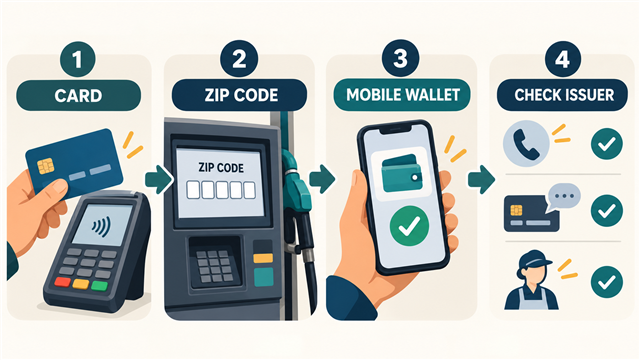
    Four-step illustration showing a card, fuel-pump ZIP code prompt, mobile wallet, and issuer check
    Identify which layer failed—the physical card, ZIP-code check, mobile wallet, or issuer approval—before choosing the next step.

    A foreign billing address may work online

    Our Korean billing address worked for online purchases we remember making. That is important because “U.S. websites never accept foreign cards” would be false. Acceptance depends on the individual merchant and its payment processor.

    Some retailers publicly state that their U.S. websites do not accept cards with foreign billing addresses. Others support them or offer another ordering method. Enter the billing address exactly as the card issuer has it, including country and postal code, and keep it separate from the shipping address. A correct U.S. delivery address does not turn a foreign billing address into a U.S. billing address.

    If the form divides the destination into unfamiliar fields, our guide to writing a U.S. mailing address explains Address Line 1, unit numbers, state abbreviations, and ZIP Codes. Use that format for the U.S. shipping destination while keeping the card’s real billing information in the billing section.

    Check these items before assuming the card is unusable

    • International use: confirm that the issuer permits U.S., online, and foreign-currency transactions for that specific card.
    • Billing information: enter the name and address held by the issuer rather than the hotel, friend’s home, or new U.S. address unless the issuer has officially updated it.
    • Available balance or credit: allow room for temporary authorizations at fuel pumps, hotels, and similar merchants.
    • Security verification: make sure the issuer can reach the registered phone number or app if it requests approval.
    • Card network and merchant policy: a merchant may accept the network but still restrict certain foreign or online transactions.
    • Fees and conversion: check the issuer’s foreign-transaction fee and exchange-rate terms before relying on the card for regular spending.

    Do not post a complete card number, security code, bank message, passport, or statement while asking for help. Use the phone number on the card or the issuer’s official app or website.

    Why a Korean card may not appear in Samsung Wallet

    Samsung states that Wallet features can vary by country, region, device model, carrier, and firmware version. It also requires a supported card from a participating institution and a country supported by the bank’s verification process. Therefore, a Korean physical card can work at a U.S. terminal without necessarily being eligible for the Wallet configuration currently active on the phone.

    Our memory is that Korean cards did not work in Samsung Pay or Samsung Wallet as expected after the move. We do not have the original error message, so we cannot honestly identify one cause. Possible layers include the card issuer’s Wallet support, the phone’s original sales region, the Wallet service region, SIM or verification requirements, and the device software.

    Does a Korean Galaxy phone block U.S. cards in Google Wallet?

    Not as a universal rule. Google says contactless payment requires a supported country or region, an eligible card, NFC, a screen lock, and a device that is Play Protect certified and meets its security requirements. The issuing bank makes the final decision about whether its card can be added.

    We remember having difficulty adding a U.S. card on a Galaxy phone originally brought from Korea, but that experience alone does not prove that every Korean-market Galaxy blocks every U.S. card. Without the exact error, it could have involved issuer approval, device or software certification, region settings, account configuration, or another setup condition.

    If Google Wallet fails, write down the exact message and separate these two errors:

    Message type Likely layer to check First useful action
    Card cannot be set up Card or issuer eligibility and verification Check Google’s supported-card list and call the issuer
    Phone cannot be set up for tap to pay NFC, default wallet, screen lock, certification, software, or device security Follow Google’s device checklist and verify Play Protect certification

    Opening a U.S. account and receiving a supported domestic debit or credit card can remove some foreign-address and issuer-eligibility complications, but approval and Wallet support still depend on the specific institution and device. Our newcomer guide to opening a U.S. bank account explains identification, address evidence, opening deposits, and institution-specific requirements.

    A practical payment backup for your first weeks

    Do not depend on one card or one phone immediately after arrival. A reasonable backup plan is:

    • carry at least two payment methods when possible;
    • keep the physical foreign card even if it is also saved digitally;
    • know how to contact the foreign issuer from the United States;
    • keep a small emergency payment alternative according to your comfort and safety needs;
    • apply for a suitable U.S. account only after comparing documents, fees, and eligibility; and
    • test a new U.S. card and mobile wallet before depending on them during a long drive.

    Our first gas-station problem was not caused by having no money or by every American merchant rejecting Korean cards. It was one verification step that we did not understand. Knowing which layer is asking the question makes the problem much easier to solve.

    Frequently asked questions

    Should I enter the ZIP code where I am staying?

    Not unless that is the billing ZIP code the card issuer has on file. A temporary U.S. location does not automatically become the billing address for a foreign card.

    Should I enter 00000 for a Korean card?

    Do not rely on an invented code. Cancel the attempt and ask the cashier how international cards are handled at that station.

    Will paying inside always work?

    No method is guaranteed. Paying inside may avoid the automated pump’s ZIP-code workflow, but the merchant, network, and issuer must still approve the card.

    Does an online decline mean my card is blocked everywhere?

    No. It may reflect one merchant’s foreign-billing policy or an address mismatch. Check the merchant’s payment rules and ask the issuer whether it saw and declined the attempt.

    Can I add any U.S. bank card to Google Wallet?

    No. The country, bank, and specific card must be supported, and the phone must satisfy Google’s contactless-payment requirements.

    Official sources

    This article provides general educational information, not individualized financial or technical advice. Card rules, issuer approvals, device compatibility, merchant acceptance, authorization holds, exchange rates, and fees can change. Follow the current instructions from your card issuer, merchant, wallet provider, and device manufacturer.

  • How to Find and Cancel Forgotten Subscriptions in the U.S.

    How to Find and Cancel Forgotten Subscriptions in the U.S.

     Information checked October 27, 2026. Subscription menus, cancellation deadlines, access periods, refund rules, and billing descriptions vary by platform, developer, service, device, account, and country. Follow the current instructions shown in your own account.

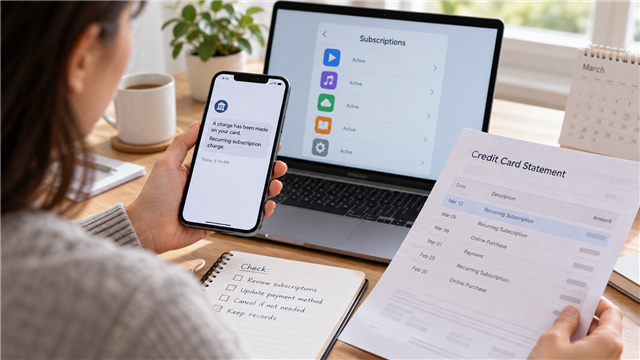
    Person reviewing a recurring subscription charge, card statement, and app-store subscription list
    A card alert can reveal the charge, but the billing platform usually determines where the subscription must be managed.


    I once started a free trial for an AI service through its website. The payment, however, was connected through the app store on my phone. When the free month changed into a paid subscription, I noticed the charge through a card text alert and the credit-card statement.

    I did not cancel it on the website where I first learned about the service. I opened the phone’s app-store settings, found the subscription section, and canceled it there. That experience taught me why forgotten subscriptions can be difficult to trace: the place where you discover a service, the place that bills you, and the place where you cancel may be different.

    Quick answer: Start with the charge, receipt, or subscription list—not your memory of the website. Identify who actually processed the payment, sign in to the same account used when subscribing, cancel through that billing platform, and save the confirmation. Deleting an app or removing a shortcut does not normally cancel its subscription.

    Three places can be involved in one subscription

    Place What may happen there What to look for Possible mistake
    Service website or app You learn about the plan, create a profile, or start a trial Plan name, renewal terms, and a billing or account page Assuming this is always where payment is managed
    App marketplace The platform processes the recurring payment and lists the subscription Correct Apple or Google account, renewal date, and cancel button Checking the wrong account and concluding the subscription is missing
    Card or bank account The charge appears through an alert and later on a statement Merchant description, amount, date, and repeated pattern Treating the card issuer as the first place to cancel an authorized service

    A subscription may be sold by one company but billed through another platform. That does not automatically mean the charge is wrong. It means the payment record—not merely the product name—may be the best clue to the correct cancellation path.

    Start with card alerts and statements

    A card text alert helped me notice the AI-service renewal quickly. The statement then provided a permanent record of the date and billing description. Alerts are useful for speed, while statements are useful for a complete monthly review.

    Scan several months, not only the current week. Look for charges repeating weekly, monthly, quarterly, or annually. Annual renewals are especially easy to forget because they may appear only once a year. Also look for a small trial-related charge followed later by a larger recurring charge.

    A statement description may show the marketplace or payment processor instead of the service name you remember. Search your email for the exact description, amount, approximate date, and words such as “receipt,” “subscription,” “renewal,” or “trial.” Do not publish the complete statement or expose account numbers while asking for help.

    Our U.S. credit-card statement guide explains merchant descriptions, transaction dates, billing errors, and why the current balance may differ from the statement balance.

    Check the account that actually owns the subscription

    On Android, Google’s official instructions say to open subscriptions in Google Play, select the subscription, and follow the cancellation steps. Google also warns that uninstalling the app does not cancel the subscription. If the subscription is missing, switch among Google accounts that may have been used.

    For subscriptions billed by Apple, Apple instructs users to open Settings, tap their name, and then open Subscriptions. If the subscription cannot be found, Apple recommends checking the receipt to determine which Apple Account was used. If there is no Apple receipt, another company may be billing the subscription.

    The exact menu can change, so use the marketplace’s current help page rather than relying on an old screenshot. The governing question is simple: which account and platform issued the receipt?

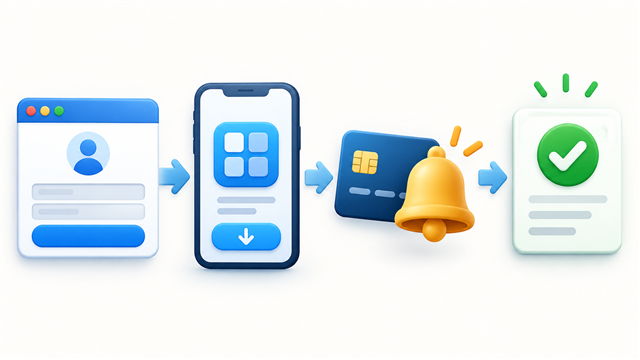
    Four-step path from website signup to app-store billing, card alert, and subscription cancellation confirmation
    The service website, billing platform, payment alert, and cancellation screen can belong to different parts of the same purchase.


    A five-place subscription search

    1. Card and bank statements: mark every repeating or unfamiliar digital charge.
    2. Text and app alerts: use recent notifications to identify when the newest charge occurred.
    3. Email receipts: search all email addresses you might have used, including spam and archived folders.
    4. App-store subscription menus: check each Apple or Google account used on the device.
    5. Service account pages: inspect billing, plan, membership, and order-history sections.

    Make a simple list with the service, billed amount, frequency, next renewal date, billing platform, login email, and whether you want to keep it. Do not record full card numbers or passwords in that list.

    Cancel in the correct place

    If the app marketplace manages the subscription, a cancel button on the service’s website may be absent or may only delete a profile. If the company bills you directly, the marketplace may have no subscription record at all. Follow the receipt and account record until you find the actual recurring plan.

    Google Play explains that after cancellation, access generally continues for the period already paid, and the next renewal is stopped. Apple similarly distinguishes an active subscription from one that already shows an expiration message. These are general platform patterns, not promises for every payment plan, prepaid product, or regional rule.

    Our previous guide explains the broader difference between AutoPay and automatic subscription renewal. Turning off a saved payment method is not a reliable substitute for canceling the recurring plan through its correct channel.

    Deleting an app is not cancellation

    An app icon controls access to software on the device. A subscription is tied to an account and billing agreement. Removing the icon may free storage, but Google explicitly states that uninstalling an app does not cancel its subscription.

    Similarly, signing out, removing a shortcut, closing a browser tab, deleting an email, or replacing a card does not prove that the subscription ended. Look for a cancellation confirmation and a date showing when access or renewal ends.

    What to save after canceling

    • a screenshot of the canceled or expiring status;
    • the confirmation email and confirmation number;
    • the cancellation date and time;
    • the date through which access remains available;
    • any separate refund request and response;
    • the next statement showing whether another charge appeared.

    Cancellation and refund are separate questions. A cancellation may stop the next renewal while leaving the latest completed charge in place. Do not write “refund received” in your records unless the credit actually posts.

    If you cannot find the subscription

    Problem Likely explanation to test Next check Do not assume
    Not listed in the app store Wrong account or direct company billing Receipt, other accounts, and service billing page The charge must be fraudulent
    Unfamiliar merchant name Marketplace, parent company, or payment processor description Email receipts and official account history The storefront name must match the statement
    Cancel button is missing Already canceled, wrong billing channel, or different plan type Expiration status and official support instructions Deleting the account will solve billing
    Another charge appears Cancellation was late, incomplete, or tied to another account Confirmation date, renewal terms, and billing account Every later charge has the same explanation

    When to contact the card issuer

    First determine whether the charge was an authorized renewal that you forgot, a charge that continued after a documented cancellation, or a transaction you never authorized. Those situations may follow different refund and dispute paths.

    If the company keeps charging after cancellation, refuses to address an unauthorized charge, or cannot be identified, contact the card issuer promptly through the number on the card or official statement. The CFPB explains that, to protect federal credit-card billing-error rights, a written notice generally must reach the issuer within 60 calendar days after the charge appeared on the statement. Continue paying correct, undisputed amounts on time.

    Do not use a dispute as a cancellation shortcut: If you knowingly subscribed and simply forgot the renewal date, explain the facts accurately. Cancel the service through the correct platform and ask about the provider’s refund policy before describing an authorized renewal as fraud.

    A ten-minute monthly subscription review

    1. Open the latest card and bank statements.
    2. Mark repeating digital charges and compare them with the prior months.
    3. Open every app-store subscription list used by the household.
    4. Check annual renewals scheduled during the next 30 days.
    5. Cancel services you no longer use through the correct billing platform.
    6. Save confirmation and verify the next statement.

    This review is also a good time to check whether a subscription price increased or a promotional period ended. A familiar merchant name does not guarantee that the amount stayed the same.

    What I would do differently

    When starting a free trial, I would immediately record three things: the account used, the platform that will process the payment, and the cancellation deadline. I would also turn on card alerts before the trial ends.

    My AI-service experience showed that remembering the original website was not enough. The card text and statement revealed the payment, but the phone’s app-store subscription menu was where I could cancel. Now I would follow the billing path rather than searching only the service website.

    Frequently asked questions

    Why is a website subscription listed in my app store?

    The website or app may have directed the purchase through the device’s marketplace. Check the receipt and billing description to identify the platform that manages renewal.

    Why can’t I find the subscription on my phone?

    You may be signed into a different Apple or Google account, the company may bill you directly, or another household member may own the subscription. Start with the receipt.

    Does deleting the app stop future charges?

    No. Cancel the subscription through the marketplace or company that manages billing and save confirmation.

    Can I still use the service after canceling?

    Many subscriptions remain available through the paid period, but the result depends on the platform and plan. Read the expiration date shown after cancellation.

    Does cancellation mean I will receive a refund?

    No. Cancellation usually concerns future renewal; refunds follow separate platform, company, and legal rules.

    Official sources

    This article provides general educational information, not individualized financial, legal, or contract advice. The subscription agreement, billing platform, card agreement, cancellation confirmation, refund policy, and applicable law control each case.

  • Autopay vs Auto-Renewal in the U.S.: What Newcomers Should Check

    Autopay vs Auto-Renewal in the U.S.: What Newcomers Should Check

    Information checked October 26, 2026. Payment methods, cancellation steps, discounts, refund rules, renewal notices, and applicable laws vary by company, service, account, and state. Confirm the current terms in your own account.

    Person reviewing recurring phone and insurance payments on a smartphone beside a calendar
    AutoPay can handle a payment, but it does not replace reviewing the bill, funding source, and service terms.


    Our U.S. phone service and insurance are both set to AutoPay, so the charges go to a card automatically. That has been convenient, and we have not had a problem with those two payments. But a free one-month trial of an AI service taught me that AutoPay and auto-renewal are not the same thing.

    I signed up for the free trial, did not cancel before it ended, and was surprised when it automatically changed into a paid subscription. I canceled after seeing the charge. The experience was a useful reminder: “free for one month” often describes only the first billing period, not a service that stops automatically.

    Quick answer: AutoPay is a method for paying a bill automatically. Auto-renewal is a contract or subscription feature that continues the service—and usually the charges—unless you cancel. Turning off AutoPay may leave the service and the amount owed in place. Canceling a subscription may stop future renewal, but it does not necessarily refund a charge that already occurred.

    AutoPay, recurring card charge, and auto-renewal

    Term What continues Typical example Main question
    AutoPay Automatic payment of an amount due A monthly phone or insurance bill is charged to a saved card Which amount, date, and payment method will be used?
    Recurring card payment Permission for a merchant to charge a card repeatedly A monthly software membership charges the card on file Did I authorize future charges, and how do I revoke them?
    Automatic bank debit A company withdraws money from a checking or savings account A provider uses account and routing information each month Is there enough money, and how can authorization be revoked?
    Auto-renewal The subscription or contract continues into another paid period A free trial becomes a monthly paid AI subscription When must I cancel to prevent the next renewal?

    A single service can use more than one of these features. A subscription can auto-renew, and the resulting charge can be paid automatically with the saved card. That is why pressing one “off” switch may not end every part of the arrangement.

    Why our phone and insurance AutoPay feel simple

    For our phone service and insurance, the service already exists and a bill becomes due. AutoPay handles the payment step by charging the card on file. It reduces the risk of forgetting a due date, but it does not guarantee that the amount is correct or that the card will always work.

    Before relying on AutoPay, check the payment date, amount setting, funding method, card expiration date, and confirmation process. Some providers offer a discount only with qualifying plans or payment methods. Changing from a bank account to a credit card—or changing cards—may affect that discount under the provider’s current terms.

    Our first U.S. phone-bill guide explains why the amount shown in an app can differ from the monthly price remembered from a store. AutoPay does not correct an unexpected plan charge, add-on, tax, or delayed promotional credit; it simply pays according to its settings.

    Why a free trial can become a paid subscription

    The Federal Trade Commission warns that many free trials require payment information and charge the customer if the trial is not canceled before it ends. The important details are the trial length, the exact cancellation deadline, the price and frequency after the trial, and the cancellation method.

    In my case, the AI service was free for one month and then renewed automatically. I had understood the free period, but I had not treated the end date as a payment deadline. When the charge appeared, I was surprised and canceled the subscription. I am not claiming the company charged without permission or that I received a refund; the lesson is that I should have recorded the conversion date when I enrolled.

    Illustration of an AI free trial changing into a recurring card payment and then being canceled
    A free trial may convert to a paid plan unless it is canceled before the deadline stated in the offer.


    A free-trial checklist before entering a card

    1. Find the exact end date and time. “One month” may not mean the final calendar day of the next month.
    2. Find the post-trial price. Check the amount, billing frequency, taxes, and whether an introductory rate later changes.
    3. Read the cancellation deadline. Some services require cancellation before the renewal date, not after the charge posts.
    4. Locate the cancellation path now. Confirm whether cancellation occurs in the service, an app store, or the platform used to subscribe.
    5. Save the offer. Keep a screenshot or email showing the trial, renewal terms, and cancellation instructions.
    6. Create two reminders. Set one several days before renewal and another on the day you plan to decide.
    7. Review the confirmation. A deleted app or closed browser tab is not proof that a subscription was canceled.

    Canceling AutoPay does not necessarily cancel the service

    This is the most important distinction. If you turn off automatic payment for a phone plan, insurance policy, loan, or other contract, the bill may still be owed. The company may expect a manual payment, and missing it can lead to fees, interruption, cancellation, or other consequences under the agreement.

    The CFPB similarly explains that stopping an automatic bank payment does not cancel the underlying contract or debt. To end a service, follow the provider’s actual cancellation procedure. If you only want to change the payment method, say that clearly rather than asking to cancel the account.

    Insurance caution: Do not stop the payment first and assume the policy remains active. Confirm the effective cancellation date, replacement coverage when needed, any balance due, and written confirmation. An unintended lapse can create a much larger problem than the recurring charge.

    Canceling a subscription does not always reverse the last charge

    A service may cancel immediately, remain available until the paid period ends, or follow another policy. A cancellation confirmation can prove that future renewal was stopped, but it does not automatically show that the most recent charge was refunded.

    After canceling, save the confirmation screen and email. Write down whether access ends immediately or on a specified date. Then check the next statement to make sure another charge does not appear.

    If a charge looks unfamiliar, first identify the merchant description and the account used to subscribe. Purchases made through an app marketplace may need to be managed through that marketplace rather than directly through the app developer. Our credit-card statement guide explains how to review merchant names, transaction dates, balances, and billing disputes.

    If you cannot remember which platform manages a recurring plan, follow our step-by-step guide to finding and canceling forgotten subscriptions through statements, receipts, app stores, and account settings.

    What to do when a company keeps charging

    1. Follow the company’s official cancellation instructions.
    2. Save screenshots, confirmation numbers, emails, and the date of every contact.
    3. Check whether you canceled only AutoPay or the actual subscription.
    4. Contact the company using its official website, app, statement, or card record.
    5. If charges continue after cancellation or were not authorized, contact the card issuer or bank promptly and ask about its dispute procedure.
    6. Continue paying legitimate, undisputed bills on time.

    For automatic withdrawals from a bank account, the CFPB says consumers can revoke authorization and may also contact the bank or credit union about stopping payments. A financial institution may charge for a stop-payment order. Revoking the debit still does not erase a valid contract or amount owed.

    For card billing problems, dispute deadlines and procedures matter. Do not wait for several more renewals while assuming the first email solved the problem. Use the contact information on the official statement or the back of the card—not a link in a suspicious renewal message.

    Fake renewal notices are another risk

    The FTC warns that scammers send renewal messages for subscriptions people may not even have. A genuine reminder for a service already set to renew should not need you to re-enter card information through an unexpected message.

    Instead of clicking an email or text link, open the provider’s known app or type its official address yourself. Check the account’s subscription page. If no matching service exists, do not call the phone number or provide payment information from the message.

    A monthly recurring-payment review

    Check Question Possible action Evidence to keep
    Amount Did the price, tax, discount, or plan change? Compare the current bill with the prior one Bill and offer terms
    Date When will the charge or debit occur? Maintain funds or change the method early AutoPay schedule
    Need Do I still use this service? Cancel through the correct account before renewal Cancellation confirmation
    Payment method Is the saved card or bank account current? Update it and check whether a discount changes Payment confirmation

    Keep enough money available for scheduled charges and maintain a buffer for variable bills. Recurring electronic payments can contribute to overdrafts or returned-payment consequences. Our common U.S. bank-fee guide explains why recurring payments need monitoring even when debit-card overdraft coverage is declined.

    What I would do differently

    I would still use AutoPay for regular phone and insurance bills because it has worked conveniently for us. But I would not treat AutoPay as permission to ignore the statements. I would check the amount and successful payment each month.

    For a free trial, I would make the cancellation decision before entering the card. I would record the exact renewal date, post-trial price, and cancellation path, then save the cancellation confirmation if I decided not to continue. That small routine would have prevented the surprise I experienced with the AI service.

    Frequently asked questions

    Does turning off AutoPay cancel my phone plan?

    Usually it changes only the payment method. The service and amount owed may continue. Check the provider’s account and cancellation terms.

    Will a free trial stop automatically?

    Do not assume it will. Many trials convert to paid subscriptions unless canceled by the stated deadline.

    Does deleting an app cancel its subscription?

    Not necessarily. Cancel through the service or marketplace that manages the subscription and save confirmation.

    Will cancellation automatically refund the renewal charge?

    Not necessarily. Refund eligibility depends on the offer, cancellation timing, provider policy, and applicable law. Ask separately about cancellation and refund status.

    Should I remove my card after canceling?

    First confirm that the subscription is canceled and save evidence. Removing a card is not a substitute for following the cancellation process, and some accounts may not allow removal while an obligation remains.

    Official sources

    This article provides general educational information, not individualized financial, insurance, legal, or contract advice. Your agreement, bill, cancellation confirmation, provider policy, payment method, and applicable law control your situation.

  • How U.S. Credit Scores Work When You Have No U.S. Credit History

    How U.S. Credit Scores Work When You Have No U.S. Credit History

     Information checked October 23, 2026. Credit-reporting practices, scoring models, card terms, and underwriting standards vary. This article provides general education; check your own reports and account terms before making a financial decision.

    Newcomer checking a generic credit score screen in a banking app beside a credit card and notebook
    A score shown in a bank app can be useful, but it may not be the same score or model a future lender uses.


    When I opened my first U.S. credit cards, a bank employee told me that my starting limit could be low because I did not yet have much U.S. credit history. That helped explain why one card started with only a $500 limit while another institution approved a higher limit. It still did not explain the unfamiliar words that appeared afterward.

    I later found a credit score inside a bank app, but terms such as FICO, credit utilization, and hard inquiry were still confusing. Was the number in the app my one official score? Did a $500 limit mean I had bad credit? Would checking the score make it fall?

    Quick answer: Having little or no U.S. credit history is not the same as having bad credit. A credit report contains account data, while a credit score is a number calculated from report information by a particular scoring model. You can have several valid scores at the same time. Build a record gradually by paying on time, keeping balances manageable, checking reports for errors, and applying for new credit only when it serves a real purpose.

    Start with four terms that sound similar

    Term What it means Newcomer example What it does not mean
    Credit report A record of reported credit accounts, balances, payment history, inquiries, and certain public or collection information. A new file may contain only one recently opened card. It is not itself a three-digit score.
    Credit score A number produced when a scoring model evaluates credit-report information. A bank app may display one educational score. It is not a permanent grade or a guarantee of approval.
    Credit limit The maximum credit currently made available on a particular account. One of our first cards had a $500 limit. It is not extra income or a spending target.
    Utilization The share of available revolving credit represented by a reported balance. A $250 balance on a $500 limit equals 50 percent. It is not the same as the minimum payment or APR.

    Keeping these definitions separate prevents several common mistakes. A bank can approve a small limit even when the applicant has not done anything wrong. A person can also have a credit report but not yet have enough eligible information for a particular scoring model to produce a score.

    No U.S. credit history is not bad credit

    “No history,” “thin file,” and “bad credit” describe different situations. Someone who recently arrived may have no record at a nationwide U.S. credit-reporting company, or a file with too little recent information for one scoring model. Bad credit usually refers to negative information or risk signals in an established file, such as missed payments or accounts in collection.

    Credit used in another country generally does not automatically appear in U.S. nationwide credit reports. Some lenders may consider international records, bank activity, income, or other permitted data through their own programs, but a newcomer should not assume that a strong history abroad has already transferred.

    This distinction mattered in my case. The bank’s explanation was that limited U.S. history could lead to a low starting limit—not that a $500 limit proved I had a bad score. Each issuer also uses its own approval and limit-setting standards, which helps explain why two institutions can reach different decisions.

    For the account-opening experience behind this story, see our guide to opening a U.S. bank account as a newcomer. A deposit account can be useful, but simply keeping money in checking does not automatically create a consumer credit history.

    Why the score in your bank app may differ from a lender’s score

    There is no single universal credit score stored in one central place. The Consumer Financial Protection Bureau explains that scores can differ because they use different scoring models, different credit-reporting companies, different versions of a model, and information from different dates.

    FICO and VantageScore are names associated with scoring-model families. They are not the three nationwide credit-reporting companies. Those companies are Equifax, Experian, and TransUnion. A lender may obtain data from one or more of them and use a score selected for a particular product.

    The number in my bank app was therefore useful for monitoring, but it was not a promise that every future lender would see exactly the same number. When you open an app, look for the score name, range, data source, and “as of” date. If those details are missing, treat the display as a general indicator rather than a universal answer.

    Five credit-profile ideas represented by on-time payments, utilization, account age, account types, and new applications
    Credit scores can reflect payment history, balances, account age, account types, and recent applications, but different models weigh information differently.

    What can affect a credit score?

    Scoring formulas are not all identical, so avoid memorizing one set of percentages as though it applies everywhere. The CFPB identifies several kinds of information that commonly matter:

    • Payment history: whether reported accounts were paid as agreed.
    • Amounts owed: balances and how much revolving credit is being used.
    • Length of history: how long eligible accounts have been open.
    • Account types: the kinds of credit represented in the file.
    • Recent applications and accounts: new inquiries and newly opened credit.
    • Serious negative information: collections or other adverse items when present.

    You do not need to borrow more, carry debt, or pay interest merely to “prove” that you use credit. The CFPB states that carrying a balance is not required for a good score. Buy only what is already affordable, then follow the statement and card agreement.

    Why utilization feels bigger with a $500 limit

    Utilization is one reason a first small limit can feel surprisingly restrictive. The same grocery purchase occupies a much larger portion of a $500 line than of a $5,000 line.

    Reported balance Limit Utilization arithmetic Practical meaning
    $50 $500 10% A small purchase uses one tenth of the line.
    $150 $500 30% A commonly discussed level, but not a magic target or guarantee.
    $250 $500 50% Half of the available line is represented by the balance.
    $450 $500 90% The account is close to its limit.

    These are arithmetic examples, not score predictions. Lower revolving balances generally present less utilization risk, but no universal rule says you must use exactly 30 percent. Spending less is not a failure.

    Also remember that the balance a card issuer reports may not match the number visible at the moment you check the app. Reporting dates and practices vary. Even if you pay in full by the due date, a balance may already have been reported at another point in the cycle. That does not mean paying in full was pointless; it means the credit-reporting date and payment due date answer different questions.

    Our first $500 credit-limit guide explains available credit and small-limit management in more detail.

    Hard inquiry versus soft inquiry

    A hard inquiry generally occurs when a lender checks credit in response to an application. It can be considered by scoring models and may affect a score. That is one reason not to submit several unnecessary applications just to see what happens.

    A soft inquiry does not affect a credit score. Checking your own credit report is generally a soft inquiry, as are certain account-review or promotional checks. Looking at the educational score in a bank app normally does not create the same kind of inquiry as applying for a new card, but read the disclosure if the app invites you to start an application.

    Watch the button wording: “View your score,” “check for offers,” and “apply now” may lead to different processes. Before continuing, look for language explaining whether the action affects your credit and whether you are submitting an application.

    A practical way to start building a U.S. record

    1. Use an account you already need. Do not open several products merely to create activity.
    2. Pay every required amount on time. Payment history is commonly important across scoring models.
    3. Keep revolving balances manageable. Avoid getting close to the limit, especially on a small-limit card.
    4. Pay attention to the statement cycle. Read the statement balance, minimum payment, due date, and APR separately.
    5. Confirm that payments posted. A scheduled payment and a completed payment are not the same screen.
    6. Apply selectively. A new application may create a hard inquiry and another account to monitor.
    7. Review credit reports for errors. Correct data matters more than chasing a daily score movement.

    If you are not approved for an unsecured card, CFPB materials identify a properly reported secured credit card or credit-builder loan as possible starting tools. Compare fees, deposit rules, reporting practices, and refund terms first. A prepaid card or debit card normally does not build credit merely because it carries a card-network logo.

    How to check your reports safely

    A credit report and a credit score are different products. The federally authorized site for free reports is AnnualCreditReport.com. It provides reports from the nationwide credit-reporting companies, but the report itself may not include a free score.

    Review your identifying information, account ownership, balances, payment status, and inquiries. A new file may be short; that alone is not an error. If you find an account you do not recognize or inaccurate information, use the reporting company’s dispute process and also contact the business that supplied the data when appropriate.

    Avoid companies that promise to erase accurate, current negative information or demand advance payment for a guaranteed score increase. There is no legitimate shortcut that replaces accurate reporting and time.

    How to read the next credit-card statement

    Credit scores can become a distraction if they pull attention away from the bill itself. On every statement, first identify the statement balance, minimum payment, due date, and APR. Paying only the minimum can leave a balance that accrues interest. When a purchase grace period applies and you are not carrying a balance, paying the full statement balance by the due date generally avoids purchase interest.

    For a line-by-line explanation, use our guide to reading a U.S. credit-card statement. It includes a fictional example and explains why the current balance can differ from the statement balance.

    What I would do differently as a newcomer

    I would not treat the first score in a bank app as my one permanent U.S. score. I would write down the model name, reporting company, date, and range shown beside it. I would also separate a low credit limit from a bad credit judgment: our own cards began with different limits even though they were opened during the same general stage of our move.

    Most importantly, I would learn the vocabulary before applying for another product. FICO is a scoring-model name, utilization compares a reported revolving balance with available credit, and a hard inquiry can be connected to a new application. Understanding those three ideas makes the app far less mysterious.

    Frequently asked questions

    How long does it take to get a credit score?

    There is no universal deadline. It depends on when creditors report, what information appears, and the eligibility rules of the scoring model being used. Do not open extra accounts simply to force a faster result.

    Is a $500 first limit proof of bad credit?

    No. A small limit can reflect the issuer’s product and underwriting decision, including limited history, but the limit alone does not reveal the complete reason. Read any approval or adverse-action notice and ask the issuer questions.

    Does checking my own score lower it?

    Checking your own report or score is generally a soft inquiry and does not lower the score. Submitting a credit application can lead to a hard inquiry, so distinguish monitoring from applying.

    Do I need to carry a balance and pay interest to build credit?

    No. The CFPB says carrying a balance is not required for a good score. Pay on time and avoid unnecessary interest.

    Why does my bank app show a different score from another service?

    The services may use different scoring models, model versions, credit-reporting companies, or update dates. Check the label and date beside each number before comparing them.

    Official sources

    This article provides general educational information, not individualized financial, credit, legal, immigration, or tax advice. Approval standards and score effects depend on the lender, report data, scoring model, timing, product, and individual circumstances.

  • USPS vs UPS vs FedEx: What Is the Difference? A Newcomer’s Guide

    USPS vs UPS vs FedEx: What Is the Difference? A Newcomer’s Guide

     Information checked October 22, 2026. Delivery locations, return options, pickup availability, fees, and participating drop-off sites vary by shipment, seller, address, and service. Always follow the tracking page or return instructions for the exact package.

    Newcomer checking package tracking beside parcels delivered near a front door and mailbox
    Amazon is the store, but USPS, UPS, FedEx, or Amazon’s own network may handle the delivery. Check the order rather than guessing from where the box appears.


    I lived in the United States and received many packages before I could clearly explain the difference between USPS, UPS, and FedEx. Amazon orders sometimes appeared at our front door and sometimes inside the mailbox. Because every box came from an Amazon purchase, it was easy to assume that “Amazon delivery” described the entire trip.

    Returns were even more confusing. For one Amazon return, we printed a label, attached it to the package, and left it outside for pickup. Another return required a trip to a shipping location. We first went to what we thought was the correct place and were told that the package belonged with the other carrier—USPS or UPS. I still had to stop and think about which name meant the Post Office and which one meant the brown delivery company.

    The mistake was understandable: USPS and UPS are different organizations, Amazon can use more than one delivery network, and a return method can change from one order to the next. The simplest solution is not to memorize every possible partnership. It is to identify the carrier assigned to the exact shipment.

    Quick answer: USPS is the United States Postal Service and handles ordinary U.S. mail as well as packages. UPS and FedEx are private package carriers. Amazon is primarily the retailer or marketplace, although its delivery network may also bring a package. If an item is placed inside an official mailbox, USPS probably completed that delivery because private carriers are not permitted to place packages there. For a return, use the company and location written in the return instructions—not the company that delivered the original order and not the nearest shipping store.

    If the address format itself is unfamiliar, read our guide to writing a U.S. mailing address. This article focuses on what happens after the address is correct: who carries the item, where it may be delivered, and where a return must go.

    USPS vs UPS vs FedEx at a glance

    Service What it is Common newcomer clue Where to start
    USPS The United States Postal Service, which delivers letters and packages The only one of these three that normally places mail inside an official residential mailbox or PO Box A Post Office, USPS.com, a USPS collection point, or the exact pickup instructions
    UPS A private package-delivery company Many tracking numbers begin with 1Z; returns may name The UPS Store or a UPS Access Point UPS.com or the specific UPS location listed in the return instructions
    FedEx A private package and express-delivery company The label or instructions say FedEx; eligible drop-offs may include FedEx Office and participating retailers FedEx.com or the exact participating location listed for the shipment
    Amazon delivery Amazon’s delivery network for eligible shipments, not a synonym for every Amazon order Amazon tracking may identify Amazon or show delivery details inside the order page Your Orders in the Amazon app or website

    This table describes the basic roles, not a promise that one company is always cheaper or faster. Price and delivery time depend on the package size, weight, distance, speed, address, and service selected. Compare the actual quote and estimated arrival for the shipment in front of you.

    1. USPS is the Postal Service—not UPS

    USPS stands for United States Postal Service. A Post Office is a USPS location. USPS delivers letters, cards, government notices, magazines, and packages. It also operates PO Boxes, offers package tracking, and provides services such as Informed Delivery where available.

    The letter order is easy to confuse:

    • USPS: U.S. Postal Service; think Post Office and mailbox.
    • UPS: United Parcel Service; think private package carrier.

    The extra S in USPS is important. If a return instruction says USPS, the starting point is the Postal Service. If it says UPS, do not assume the Post Office is the correct drop-off just because both organizations carry boxes.

    2. UPS is a private package carrier

    UPS transports and delivers packages through its own network. The UPS Store, UPS Access Point locations, UPS Drop Boxes, and UPS operating facilities do not all provide identical services. A participating Access Point may accept or hold an eligible package, while a full-service location may offer additional help such as packaging or label services.

    A UPS tracking number often begins with 1Z, and UPS lists that as one of its standard formats. That can be a useful clue, but the safest evidence is still the carrier name on the label or the retailer’s return screen. Some special services use other formats.

    Do not choose a location only because its sign says UPS. If the return uses a QR code, confirm that the selected location can process that specific code. If the package is already boxed and has a printed UPS label, use the drop-off finder or the exact directions supplied with the return.

    3. FedEx is another private package carrier

    FedEx also transports packages through its own ground and express networks. Depending on the service, a customer may use a FedEx Office, FedEx Ship Center, FedEx Drop Box, or a participating retailer. FedEx can also hold eligible incoming packages at participating locations for pickup.

    FedEx’s current return guidance is unusually clear about carrier matching: a FedEx location processes FedEx shipments, not packages labeled for UPS or USPS. A printed FedEx label can be taken to an appropriate FedEx drop-off location. A FedEx-issued QR code must go to a participating location that can scan that code.

    The lesson applies in both directions. A building that offers shipping services is not automatically a universal return counter. Read the carrier and service written in the instructions before driving there.

    Why can an Amazon package be in the mailbox one day and at the door the next?

    Amazon is where you bought the item; it is not necessarily the company that performs every delivery step. Amazon may deliver an eligible order through its own transportation network or use another carrier. Amazon Shipping also says it works with USPS for some destinations, including PO Boxes and remote areas.

    USPS states that only authorized Postal Service delivery personnel may place postage-paid U.S. Mail inside an official mailbox. Private drivers from UPS, FedEx, or Amazon are not allowed to use that mailbox. Therefore:

    • If a small Amazon parcel is inside your official mailbox, USPS most likely completed the final delivery.
    • If a parcel is at the front door, it could have been delivered by Amazon, UPS, FedEx, or USPS. Location alone does not identify the carrier.
    • If a parcel is in a cluster-box parcel locker, check the key, notice, or tracking details to understand the local process.
    • If the order is sent to a PO Box, USPS handles placement into that box; private carriers cannot place items directly inside it.

    This explains our own experience. The order source stayed the same—Amazon—but the delivery company and final location could change. Seeing one box at the door and another in the mailbox was not necessarily inconsistent.

    The fastest way to identify who delivered a package

    1. Open the exact order. Go to the retailer’s order history rather than starting with a general web search.
    2. Select Track package. Look for a carrier name, tracking link, delivery photo, or “shipped with” information.
    3. Open the carrier link. If the retailer provides a direct tracking link, follow it instead of guessing from the number.
    4. Compare the final scan with the location. “Delivered in mailbox,” “front door,” “parcel locker,” and “held for pickup” describe different outcomes.
    5. Save the tracking number. Use it when contacting the seller or carrier about a missing package.

    A porch delivery does not prove that Amazon’s own driver handled the box. A mailbox delivery is a much stronger USPS clue because mailbox access is restricted.

    Return package beside a phone showing a three-step check of label, location, and drop-off instructions
    Before leaving home, match the carrier on the label or QR-code instructions to the exact drop-off location.

    Why Amazon return methods change from one item to another

    Amazon’s current help guidance says available return options can depend on the seller, item, reason for return, and other order details. One item may offer a label-free, box-free QR-code return. Another may require a printed label and sealed box. A third may offer pickup from the address.

    That is why our two Amazon returns did not match. Leaving a labeled package outside for an authorized pickup was correct only because that return instructed us to do it. Printing a label and driving to a carrier location was a different method. Neither method should be copied automatically for the next item.

    Our broader guide to returns and refunds at U.S. stores explains how deadlines, receipts, sellers, item conditions, and refund methods can also vary.

    How to know where an Amazon return goes

    What the return screen gives you What to do Common mistake to avoid
    USPS printed label Package the item, attach the label correctly, and follow the listed USPS acceptance or pickup instructions Taking it to UPS because the names look similar
    UPS printed label Use the specified UPS option or an eligible UPS drop-off location Taking it to a Post Office simply because it is a package
    FedEx printed label Use an appropriate FedEx drop-off location Assuming a UPS or USPS location can process a FedEx shipment
    QR code with a named location Take the item and code to one of the specifically listed participating locations; follow the box and packaging instructions Assuming every branch or shipping counter accepts the same code
    Scheduled pickup Follow the pickup date, placement, packaging, and label directions shown for that return Leaving the package outside before pickup is actually arranged

    Before closing the return screen, take a screenshot or save the confirmation email. Check four things: carrier, packaging requirement, label or QR code, and deadline. Amazon also warns that each return label is assigned to a particular return, so do not combine unrelated items in one box unless the instructions explicitly allow it.

    A five-second carrier check before you leave home

    1. Look for the large carrier name or logo on the printed label.
    2. Read the line that names the drop-off location or pickup method.
    3. If the label says UPS, remember that UPS is not USPS.
    4. If you have only a QR code, open the return details and verify the participating location.
    5. Confirm whether the item needs a box and printed label or should remain unpackaged.

    The tracking-number format can provide a clue, but it should not replace the written instructions. Retailers may use consolidated shipping or partner services, and a package can move through more than one network.

    What should you do if you arrive at the wrong location?

    Do not feel embarrassed; USPS and UPS are easy to confuse, especially for someone new to the country. Ask the employee which carrier appears on the label and which type of location is required. Then reopen the return confirmation and search using that carrier’s official location finder.

    Do not buy a new shipping label immediately unless the retailer’s instructions require you to pay. The original return may already include prepaid transportation. Replacing it unnecessarily can make tracking and refund matching harder. Keep the original label, return authorization, QR code, and deadline together until the return is accepted.

    After drop-off, request or save a receipt when one is available. Check that the tracking number on the receipt matches the return. A photo of the labeled package before handoff can also help document its condition and routing.

    What if tracking says delivered but you cannot find the package?

    1. Read the exact delivery location in the tracking details.
    2. Check the front door, side door, garage, mailbox, parcel locker, mailroom, leasing office, and other property-approved areas.
    3. Ask household members or the property office whether they accepted it.
    4. Confirm that the shipping address and unit number were correct.
    5. Use the retailer’s order help and the identified carrier’s official tracking support.

    Do not report the wrong carrier. If the Amazon order page links to USPS, begin with USPS tracking. If it links to UPS or FedEx, use that carrier’s tools. If Amazon’s own network handled the delivery, start with Amazon order support.

    Helpful delivery tools from each carrier

    • USPS Informed Delivery: eligible users can preview certain incoming mail images and follow package information through email or a dashboard.
    • UPS My Choice: eligible users can receive alerts and manage certain UPS deliveries.
    • FedEx Delivery Manager: eligible users can receive notifications and request options such as holding certain packages at a location.

    Availability and options vary. Sign up only through each carrier’s official website or app, and be cautious with unexpected text messages that demand payment or personal information.

    My newcomer rule now

    I no longer treat “Amazon package” as the name of the carrier. Amazon tells me where I bought it. The order page, label, or return instructions tell me who is handling that particular delivery or return.

    I also use one simple memory aid:

    • USPS = Post Office and mailbox.
    • UPS = a separate private carrier.
    • FedEx = another separate private carrier.
    • Amazon = check the exact order because the carrier can change.

    That does not answer every price or service question, but it prevents the most frustrating beginner mistake: taking a correctly labeled return to the wrong company.

    Newcomer shipping checklist

    • Confirm the complete address, apartment or unit, state abbreviation, and ZIP Code.
    • Open the exact order and identify the carrier.
    • Check whether delivery is expected at the door, mailbox, mailroom, office, or parcel locker.
    • For a return, record the carrier, packaging requirement, drop-off location, and deadline.
    • Use only a participating location for a QR-code return.
    • Keep the acceptance receipt and tracking number until the refund is complete.
    • Use official carrier websites when tracking, redirecting, or locating a drop-off point.

    For more step-by-step newcomer topics, visit the Start Here guide.

    Frequently asked questions

    Are USPS and UPS the same company?

    No. USPS is the United States Postal Service. UPS is United Parcel Service, a private package carrier. The similar letters cause frequent confusion.

    Why was my Amazon package placed inside my mailbox?

    USPS likely completed the delivery. Only authorized Postal Service personnel may place postage-paid mail inside an official mailbox. Amazon may use USPS for some deliveries even though the order was purchased through Amazon.

    Can UPS, FedEx, or Amazon drivers put packages in my mailbox?

    Not in an official USPS mailbox or PO Box. Private carriers normally deliver to another approved location such as the door, package room, office, or carrier pickup point.

    Can I take every Amazon return to The UPS Store?

    No. Use the return method offered for that specific order. Some returns use UPS, but others may use USPS, another carrier, a named retail drop-off, pickup, or a different method.

    How do I tell whether a return label is USPS, UPS, or FedEx?

    Look for the carrier name or logo and read the return instructions. A UPS number often begins with 1Z, but label branding and the retailer’s directions are more reliable than number format alone.

    Does the carrier that delivered the item always handle the return?

    No. The retailer may assign a different return method. Follow the return confirmation for the exact item instead of relying on the original delivery company.

    Official sources

    This article provides general educational information. Carrier services, retailer return methods, participating locations, fees, delivery practices, and deadlines can change. The instructions attached to the specific shipment or return control.