Information checked October 27, 2026. Subscription menus, cancellation deadlines, access periods, refund rules, and billing descriptions vary by platform, developer, service, device, account, and country. Follow the current instructions shown in your own account.
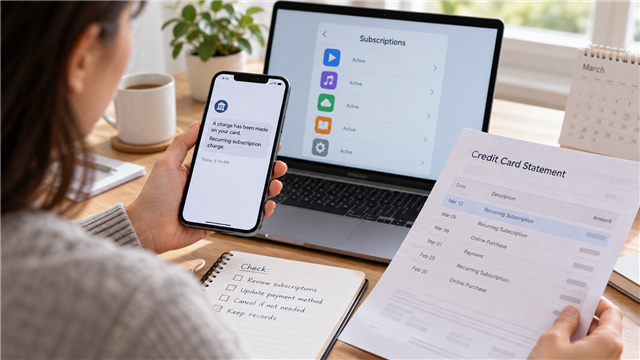 |
| A card alert can reveal the charge, but the billing platform usually determines where the subscription must be managed. |
I once started a free trial for an AI service through its website. The payment, however, was connected through the app store on my phone. When the free month changed into a paid subscription, I noticed the charge through a card text alert and the credit-card statement.
I did not cancel it on the website where I first learned about the service. I opened the phone’s app-store settings, found the subscription section, and canceled it there. That experience taught me why forgotten subscriptions can be difficult to trace: the place where you discover a service, the place that bills you, and the place where you cancel may be different.
Three places can be involved in one subscription
| Place | What may happen there | What to look for | Possible mistake |
|---|---|---|---|
| Service website or app | You learn about the plan, create a profile, or start a trial | Plan name, renewal terms, and a billing or account page | Assuming this is always where payment is managed |
| App marketplace | The platform processes the recurring payment and lists the subscription | Correct Apple or Google account, renewal date, and cancel button | Checking the wrong account and concluding the subscription is missing |
| Card or bank account | The charge appears through an alert and later on a statement | Merchant description, amount, date, and repeated pattern | Treating the card issuer as the first place to cancel an authorized service |
A subscription may be sold by one company but billed through another platform. That does not automatically mean the charge is wrong. It means the payment record—not merely the product name—may be the best clue to the correct cancellation path.
Start with card alerts and statements
A card text alert helped me notice the AI-service renewal quickly. The statement then provided a permanent record of the date and billing description. Alerts are useful for speed, while statements are useful for a complete monthly review.
Scan several months, not only the current week. Look for charges repeating weekly, monthly, quarterly, or annually. Annual renewals are especially easy to forget because they may appear only once a year. Also look for a small trial-related charge followed later by a larger recurring charge.
A statement description may show the marketplace or payment processor instead of the service name you remember. Search your email for the exact description, amount, approximate date, and words such as “receipt,” “subscription,” “renewal,” or “trial.” Do not publish the complete statement or expose account numbers while asking for help.
Our U.S. credit-card statement guide explains merchant descriptions, transaction dates, billing errors, and why the current balance may differ from the statement balance.
Check the account that actually owns the subscription
On Android, Google’s official instructions say to open subscriptions in Google Play, select the subscription, and follow the cancellation steps. Google also warns that uninstalling the app does not cancel the subscription. If the subscription is missing, switch among Google accounts that may have been used.
For subscriptions billed by Apple, Apple instructs users to open Settings, tap their name, and then open Subscriptions. If the subscription cannot be found, Apple recommends checking the receipt to determine which Apple Account was used. If there is no Apple receipt, another company may be billing the subscription.
The exact menu can change, so use the marketplace’s current help page rather than relying on an old screenshot. The governing question is simple: which account and platform issued the receipt?
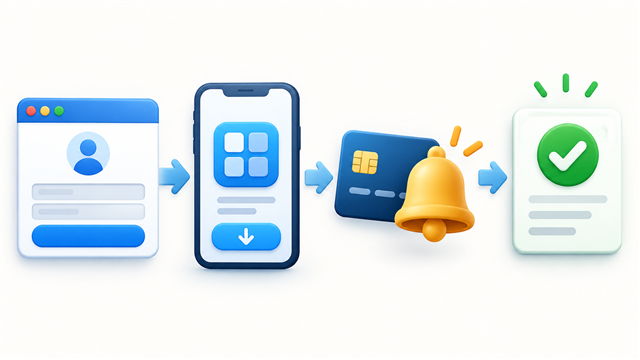 |
| The service website, billing platform, payment alert, and cancellation screen can belong to different parts of the same purchase. |
A five-place subscription search
- Card and bank statements: mark every repeating or unfamiliar digital charge.
- Text and app alerts: use recent notifications to identify when the newest charge occurred.
- Email receipts: search all email addresses you might have used, including spam and archived folders.
- App-store subscription menus: check each Apple or Google account used on the device.
- Service account pages: inspect billing, plan, membership, and order-history sections.
Make a simple list with the service, billed amount, frequency, next renewal date, billing platform, login email, and whether you want to keep it. Do not record full card numbers or passwords in that list.
Cancel in the correct place
If the app marketplace manages the subscription, a cancel button on the service’s website may be absent or may only delete a profile. If the company bills you directly, the marketplace may have no subscription record at all. Follow the receipt and account record until you find the actual recurring plan.
Google Play explains that after cancellation, access generally continues for the period already paid, and the next renewal is stopped. Apple similarly distinguishes an active subscription from one that already shows an expiration message. These are general platform patterns, not promises for every payment plan, prepaid product, or regional rule.
Our previous guide explains the broader difference between AutoPay and automatic subscription renewal. Turning off a saved payment method is not a reliable substitute for canceling the recurring plan through its correct channel.
Deleting an app is not cancellation
An app icon controls access to software on the device. A subscription is tied to an account and billing agreement. Removing the icon may free storage, but Google explicitly states that uninstalling an app does not cancel its subscription.
Similarly, signing out, removing a shortcut, closing a browser tab, deleting an email, or replacing a card does not prove that the subscription ended. Look for a cancellation confirmation and a date showing when access or renewal ends.
What to save after canceling
- a screenshot of the canceled or expiring status;
- the confirmation email and confirmation number;
- the cancellation date and time;
- the date through which access remains available;
- any separate refund request and response;
- the next statement showing whether another charge appeared.
Cancellation and refund are separate questions. A cancellation may stop the next renewal while leaving the latest completed charge in place. Do not write “refund received” in your records unless the credit actually posts.
If you cannot find the subscription
| Problem | Likely explanation to test | Next check | Do not assume |
|---|---|---|---|
| Not listed in the app store | Wrong account or direct company billing | Receipt, other accounts, and service billing page | The charge must be fraudulent |
| Unfamiliar merchant name | Marketplace, parent company, or payment processor description | Email receipts and official account history | The storefront name must match the statement |
| Cancel button is missing | Already canceled, wrong billing channel, or different plan type | Expiration status and official support instructions | Deleting the account will solve billing |
| Another charge appears | Cancellation was late, incomplete, or tied to another account | Confirmation date, renewal terms, and billing account | Every later charge has the same explanation |
When to contact the card issuer
First determine whether the charge was an authorized renewal that you forgot, a charge that continued after a documented cancellation, or a transaction you never authorized. Those situations may follow different refund and dispute paths.
If the company keeps charging after cancellation, refuses to address an unauthorized charge, or cannot be identified, contact the card issuer promptly through the number on the card or official statement. The CFPB explains that, to protect federal credit-card billing-error rights, a written notice generally must reach the issuer within 60 calendar days after the charge appeared on the statement. Continue paying correct, undisputed amounts on time.
A ten-minute monthly subscription review
- Open the latest card and bank statements.
- Mark repeating digital charges and compare them with the prior months.
- Open every app-store subscription list used by the household.
- Check annual renewals scheduled during the next 30 days.
- Cancel services you no longer use through the correct billing platform.
- Save confirmation and verify the next statement.
This review is also a good time to check whether a subscription price increased or a promotional period ended. A familiar merchant name does not guarantee that the amount stayed the same.
What I would do differently
When starting a free trial, I would immediately record three things: the account used, the platform that will process the payment, and the cancellation deadline. I would also turn on card alerts before the trial ends.
My AI-service experience showed that remembering the original website was not enough. The card text and statement revealed the payment, but the phone’s app-store subscription menu was where I could cancel. Now I would follow the billing path rather than searching only the service website.
Frequently asked questions
Why is a website subscription listed in my app store?
The website or app may have directed the purchase through the device’s marketplace. Check the receipt and billing description to identify the platform that manages renewal.
Why can’t I find the subscription on my phone?
You may be signed into a different Apple or Google account, the company may bill you directly, or another household member may own the subscription. Start with the receipt.
Does deleting the app stop future charges?
No. Cancel the subscription through the marketplace or company that manages billing and save confirmation.
Can I still use the service after canceling?
Many subscriptions remain available through the paid period, but the result depends on the platform and plan. Read the expiration date shown after cancellation.
Does cancellation mean I will receive a refund?
No. Cancellation usually concerns future renewal; refunds follow separate platform, company, and legal rules.
Official sources
- Google Play Help: Cancel, pause, or change a subscription
- Apple Support: Cancel a subscription
- Apple Support: View purchases and subscriptions
- FTC: Free trials, auto-renewals, and subscriptions
- CFPB: Disputing a credit-card charge
- CFPB: How to fix mistakes in a credit-card bill
This article provides general educational information, not individualized financial, legal, or contract advice. The subscription agreement, billing platform, card agreement, cancellation confirmation, refund policy, and applicable law control each case.