 |
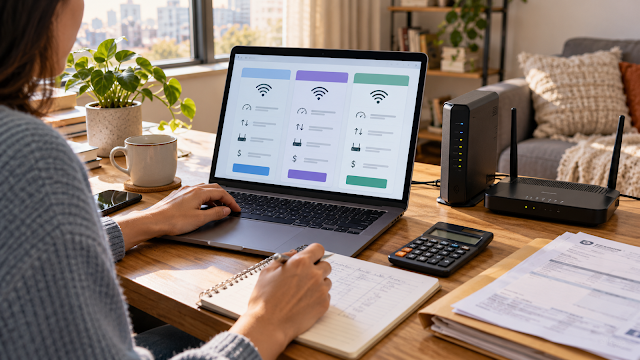
Compare the regular price and every recurring charge—not only the promotional headline. |
Information checked October 8, 2026.
Choosing home internet in the United States can be confusing because availability changes by address and the advertised monthly price may not equal the amount you eventually see in an account app or bill. Speed, equipment, installation, data limits, autopay discounts, and promotional expiration dates can all affect the real value.
We arranged internet service through T-Mobile. After signup, the amount displayed in the app appeared higher than the amount we remembered being told initially. We did not determine the exact reason, so we cannot claim that a particular fee or billing mistake caused the difference. The experience taught us to save the written offer and compare it line by line with the account details and first bill.
1. Check the exact address before comparing plans
A provider may serve your city but not your building, street, or apartment unit. Even within one building, installation condition or existing wiring may affect the available option.
Use three sources:
- The property manager: Ask which providers currently serve the building and whether installation restrictions or mandatory packages apply.
- Each provider’s official address checker: Enter the complete address and unit number.
- The FCC National Broadband Map: Use it to identify providers that report service at the location, then verify directly with them.
The FCC map is a starting point, not a guarantee that a specific appointment, technology, or speed is immediately available. Confirm before canceling another service or scheduling a move.
2. Identify the connection type
| Type | What to ask | Possible trade-off |
|---|---|---|
| Fiber | Upload speed, installation, gateway, availability at the unit | Strong performance potential but limited availability |
| Cable | Regular price, upload speed, modem/router, congestion terms | Widely available in many areas; upload can be lower than download |
| Fixed wireless or 5G home internet | Address eligibility, expected speed range, gateway placement, congestion | Simple setup can be attractive, but performance may vary by signal and demand |
| DSL | Actual speed at the address and equipment | May be available where faster wired options are limited |
| Satellite | Equipment purchase, installation, data rules, latency, obstruction | Useful in some rural areas; equipment and performance conditions need careful review |
Do not assume that one technology is automatically best everywhere. Compare the actual plan offered to your address and how your household uses the connection.
3. Read the Broadband Consumer Label
The FCC requires most internet service providers to display a Broadband Consumer Label for covered standalone plans. It uses a standardized format intended to help shoppers see important information near the point of sale.
Look for:
- base monthly price;
- introductory rate and the price after it ends;
- additional charges and terms;
- typical download speed;
- typical upload speed;
- typical latency;
- included data and overage policy;
- contract information; and
- links to network management, privacy, and customer support information.
Save the label as a screenshot or PDF along with the order confirmation. If a phone or store representative quotes a different amount, ask which exact line of the label or order summary explains the difference.
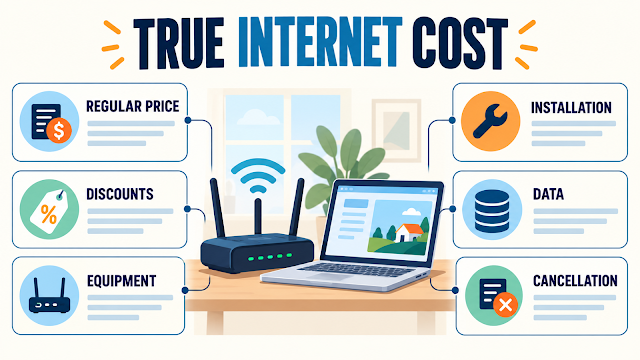 |
Record the regular price, discounts, equipment, installation, data, and cancellation terms separately. |
4. Calculate the full first-year cost
A promotional price may last for only part of the year. A more useful comparison is the total you expect to pay over the first 12 months.
monthly service charges + equipment + installation and activation + required add-ons + estimated taxes and provider fees − confirmed discounts
Keep these items on separate lines:
- promotional monthly rate;
- regular monthly rate;
- promotion end date;
- autopay or paperless-billing discount;
- mobile-service bundle discount;
- modem, router, or gateway rental;
- professional installation;
- self-installation kit or shipping;
- activation charge;
- data overage; and
- early termination or non-returned equipment charge.
A discount is not part of your budget until you know its requirements and see it applied. Ask when a new discount begins and whether the first bill will be prorated.
5. Choose speed based on real household use
A higher advertised speed is not automatically worth a higher price. Make a list of simultaneous uses:
- video calls for work or school;
- streaming on one or more televisions;
- online gaming;
- cloud backups and large uploads;
- security cameras;
- smart-home devices; and
- mobile phones and tablets using Wi-Fi.
Download speed receives the most advertising attention, but upload speed and latency can matter for video calls, remote work, gaming, and sending large files. Compare the label’s typical performance figures, not only an “up to” headline.
6. Ask about equipment and installation
Confirm whether the plan includes a modem, router, or wireless gateway and whether it must be returned. Ask:
- Is the equipment rented, included, or purchased?
- Can I use compatible equipment that I own?
- Is self-installation available?
- Does professional installation cost extra?
- Where should a fixed-wireless gateway be placed?
- How long do I have to return equipment after cancellation?
- What receipt proves that equipment was returned?
Keep the serial number, shipping record, installation confirmation, and return receipt. Equipment disputes are difficult to solve if you cannot identify the device or prove its return.
7. Compare data limits and congestion terms
“Unlimited” should be read with the detailed terms. Ask whether the plan has:
- a fixed monthly data allowance;
- overage charges;
- reduced speeds after a threshold;
- different treatment during congestion;
- video-quality limits; or
- network-management rules for heavy use.
The answer can differ by technology and plan. Use the Broadband Consumer Label and the provider’s network-management link for the exact offer.
8. Check whether the building creates additional rules
Renters should ask the property manager whether:
- one provider is required or bundled;
- internet is already charged through the resident portal;
- a technician needs permission to enter a utility room;
- drilling or exterior equipment is restricted;
- the unit already contains provider equipment; and
- service must be active before move-in.
Our guide to utilities included in U.S. rent explains why internet can be included, bundled, billed by the property, or opened in the tenant’s name.
9. Compare the first app amount and bill with the written offer
When our app appeared to show a higher amount than we remembered, the correct response was not to guess. A difference could come from many sources: a misunderstood quote, an unapplied discount, a prorated period, service plus equipment, optional features, or another billing detail.
Use this review order:
- Open the detailed bill or order summary, not only the app’s overview number.
- Compare the exact plan name.
- Confirm the billing dates.
- Find every discount and its start date.
- Identify equipment, installation, add-ons, taxes, and provider fees.
- Ask the provider to explain any remaining difference in writing.
For the complete moving sequence, see how to set up utilities and internet after moving in the U.S.. Our hidden-costs guide also explains why introductory prices and equipment charges belong in the household budget.
A one-page comparison table
| Item | Plan A | Plan B |
|---|---|---|
| Connection type | ||
| Promotional price and end date | ||
| Regular monthly price | ||
| Equipment and installation | ||
| Typical download/upload/latency | ||
| Data rules | ||
| Contract/cancellation/returns | ||
| Estimated first-year total |
Frequently asked questions
Is the fastest internet plan always best?
No. Choose enough capacity for your simultaneous activities, then compare reliability, upload speed, latency, equipment, data rules, and total price.
Is the advertised monthly price the final bill?
Not necessarily. Check the Broadband Consumer Label and order summary for regular price, introductory terms, equipment, installation, taxes, fees, and required discounts.
Should I rent or buy a router?
It depends on provider compatibility, support, upfront cost, rental cost, replacement policy, and how long you expect to keep the service. Confirm whether using your own equipment changes technical support.
Can an apartment require a particular provider?
A property may have building-specific wiring, a preferred provider, or a required package. Ask for the written lease or addendum terms and confirm what alternatives are technically available.
What should I save after signup?
Save the Broadband Consumer Label, order summary, promotion terms, appointment confirmation, equipment serial number, installation record, and all return receipts.
The bottom line
The best internet plan is not necessarily the one with the largest speed or smallest promotional number. It is the plan available at your exact address that provides enough performance at a total cost and set of terms you understand.
Save the written offer, calculate the first-year total, and compare the app and first bill line by line. If the amount differs, identify the reason before assuming either that the provider made an error or that the advertisement included every charge.
Sources
- Federal Communications Commission: National Broadband Map
- Federal Communications Commission: How to Use the National Broadband Map
- Federal Communications Commission: Broadband Consumer Label Fact Sheet
- Federal Communications Commission: Broadband Label Compliance Requirements
This article provides general educational information. Availability, performance, prices, promotions, equipment, data rules, and billing vary by provider, address, technology, account, and date.