 |
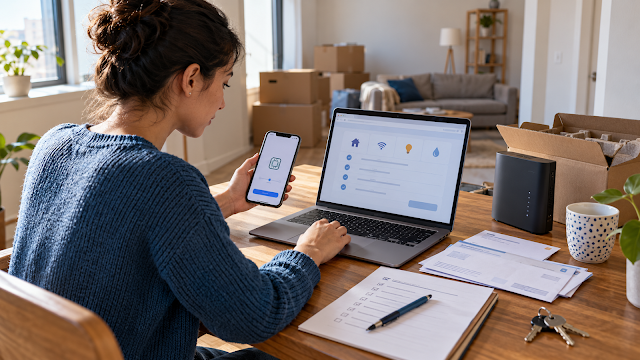
| Check the lease, providers, device compatibility, identification requirements, and start dates before moving in. |
Information checked October 8, 2026.
Setting up a new home in the United States can involve several separate companies. Electricity may come from one provider, natural gas from another, water from the city, and internet from a private company. Each service may have its own application, identification rules, deposit decision, equipment, and start date.
Our experience was simpler in one way: electricity, gas, and water were included in our housing arrangement, so we did not open those accounts ourselves. We did, however, arrange internet and mobile phone service. We initially explored Spectrum, but the Korean-market Galaxy phone we brought did not pass the device-compatibility step we encountered. We ultimately used T-Mobile, activated the phone with an eSIM, and also obtained internet service through T-Mobile.
If you are setting up phone or internet service, first check whether your device will work with a U.S. carrier. Use our foreign-phone compatibility checklist, compare prepaid and postpaid phone plans, and review our home internet comparison guide.
We also learned that identification can become a practical obstacle for newcomers. Some signup processes we encountered expected a U.S. driver’s license, which we did not yet have. That does not mean every provider requires a U.S. license. It means you should check accepted identification before choosing a plan, paying a fee, or visiting a store.
1. Start with the lease—not a provider’s website
Do not open accounts until you know which services are actually your responsibility. A landlord may include water and trash, bill some utilities through a resident portal, or require you to place electricity and gas in your own name.
Check the lease, utility addendum, move-in instructions, and written fee schedule. Ask the property manager:
- Which utilities are included in the base rent?
- Which services are billed separately by the property?
- Which accounts must be opened in the tenant’s name?
- Which exact providers serve the address?
- When must service begin to receive the keys?
- Does the property require proof of activation?
- Are internet, trash, or resident-service packages mandatory?
If those answers are unclear, use our newcomer’s checklist to utilities included in U.S. rent before opening any account.
2. Make one service list for the exact address
Provider availability can change by street, building, apartment, or utility territory. A company serving one side of a city may not serve another address. An apartment building may also limit internet installation or use a preferred provider.
| Service | Who can confirm the provider? | What to verify |
|---|---|---|
| Electricity | Property manager or local utility | Account responsibility, meter, start date, deposit |
| Gas or heating fuel | Property manager or local provider | Whether it serves heat, hot water, cooking, or all three |
| Water, sewer, and trash | Property manager, city, or utility district | Tenant account, landlord bill, flat fee, or inclusion in rent |
| Home internet | Provider address checker, property manager, and FCC map | Technology, speed, total price, equipment, installation |
| Mobile phone | Carrier coverage and IMEI tools | Coverage, unlocked status, device compatibility, SIM or eSIM |
The FCC National Broadband Map can show fixed internet providers that report service at a specific address. Treat it as a starting point, then confirm availability directly with the provider because building-level installation and current capacity can still affect service.
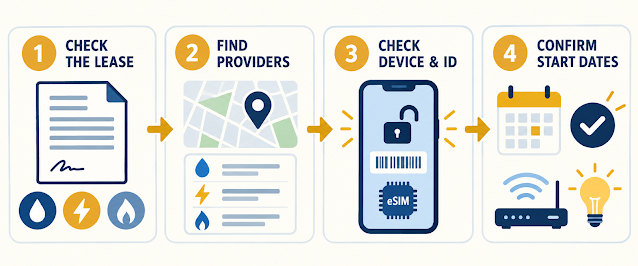 |
| A simple order for setting up utilities, internet, and mobile service after a move. |
3. Gather information before starting an application
Requirements vary by provider, location, service type, account type, and credit-check policy. Prepare the following, but provide sensitive information only through a verified provider website, official app, phone number, or store:
- Full legal name
- Exact service address, including the apartment or unit number
- Move-in date and requested service-start date
- Email address and working phone number
- Lease or proof of occupancy if requested
- An accepted government-issued identity document
- Social Security number, Individual Taxpayer Identification Number, or another option only if the provider requires and accepts it
- Payment method for deposits, activation charges, or the first bill
- Previous provider information if transferring a mobile number
- Phone IMEI and EID information when bringing an existing device
If an online application splits the same location into Address Line 1 and Address Line 2, our guide to writing a U.S. mailing address explains where the street, apartment or unit, state abbreviation, and ZIP Code commonly belong.
4. Ask about deposits before choosing the account
A provider may require a deposit, especially when it cannot verify identity, payment history, or U.S. credit information through its normal process. The amount and waiver rules vary.
The Consumer Financial Protection Bureau explains that some utility and telecommunications providers use specialty consumer reports when deciding whether to require a deposit. It also notes that unpaid utility debt sent to collections can appear on major credit reports.
Before paying, ask:
- Is a deposit required for this specific account?
- What information was used to make that decision?
- Can the deposit be waived with another form of identification or payment history?
- When and how will the deposit be returned?
- Is the amount a refundable deposit or a nonrefundable setup fee?
- Does autopay change the price, deposit, or payment date?
Include deposits and connection charges in your U.S. apartment move-in budget. Do not treat a refundable deposit as money available for another bill.
5. Schedule the start date carefully
Do not wait until move-in day. Electricity or gas may be activated remotely, but some situations require an appointment, meter access, equipment delivery, or an adult at the property. Internet installation can also depend on technician availability and whether the unit already has a usable connection.
Ask each provider:
- What is the earliest available start date?
- Does someone need to be present?
- Will equipment be mailed, picked up, or installed?
- Is there an installation or activation charge?
- Can the start date be changed without a fee?
- What confirmation proves the account is active?
Save the order number, appointment window, account number, equipment receipt, and every confirmation email. If the property requires proof of service, ask what document it accepts.
6. Compare internet plans using the full price
Internet advertising often emphasizes one monthly number, but the real cost may include equipment, installation, activation, data limits, taxes, or a price increase after a promotional period.
The FCC requires most providers to display a Broadband Consumer Label for standalone home and mobile internet plans. It is designed to show information such as the monthly price, introductory-rate details, additional charges, data allowances, and typical performance.
Before ordering, compare:
- the regular monthly price;
- the promotional price and expiration date;
- download and upload speeds;
- data allowances or overage terms;
- router, modem, or gateway charges;
- installation and activation fees;
- contract or cancellation terms;
- autopay requirements; and
- equipment-return instructions.
A low first-month price is not automatically the least expensive option over a full year. Our guide to hidden costs of living in the United States explains why promotional pricing and equipment charges belong in the total budget.
7. Bringing a phone from another country: check the IMEI first
A phone can be physically unlocked and still fail a carrier’s compatibility check. Model variants sold in different countries may support different network bands, software configurations, calling features, SIM combinations, or carrier certification requirements.
Our Korean-market Galaxy was a real example. We first considered Spectrum, but the phone did not pass the compatibility step we encountered. We then used T-Mobile and activated mobile service with an eSIM. This was a device-specific mobile-service experience. It does not mean that every Galaxy purchased in Korea will fail with Spectrum, and it does not say anything about whether Spectrum home internet is available at an address.
Before choosing a mobile carrier:
- Confirm that the phone is unlocked. An unlocked phone is not restricted to the original carrier, but unlocking alone does not guarantee compatibility.
- Find the correct IMEI. Dial
*#06#or check the phone settings. Dual-SIM phones may show more than one IMEI. - Use the carrier’s official compatibility checker. Do this before buying a plan or canceling existing service.
- Check eSIM support for the exact model. A phone line, model family, or country variant may not support the same activation method.
- Ask about required identification. Postpaid service may involve identity verification and a credit check. Prepaid requirements can differ.
- Do not cancel the old number too early. If transferring a number, keep the previous account active until the transfer succeeds.
T-Mobile’s official BYOD guidance says a device must be unlocked and recommends using its IMEI compatibility checker. Its prepaid eSIM instructions also require an unlocked, compatible eSIM device. Spectrum likewise tells customers to enter the phone’s IMEI, use an unlocked device, and confirm that the specific device is supported.
8. Understand the identification problem before visiting a store
Newcomers often arrive before receiving a state driver’s license, state ID, established U.S. credit file, or long payment history. That can make an otherwise simple application more complicated.
In our case, some options did not work because a signup process expected a U.S. driver’s license and we did not yet have one. We did not assume that every company followed the same rule. Instead, we found a service and activation method that worked with our device and available documents.
If you face the same problem, ask the provider directly:
- Which government-issued IDs are accepted?
- Is a passport accepted?
- Is a U.S. state ID accepted instead of a driver’s license?
- Is there a prepaid or deposit-based option?
- Can the application be completed in a store instead of online?
- Is a credit check required for this specific plan?
- Can I bring my own unlocked device?
Do not recommend an identification workaround to someone else based only on one store visit. Provider policies and verification systems can change, and an employee may need to check current alternatives.
A practical setup timeline
| When | What to do |
|---|---|
| After lease approval | Obtain the written utility list, exact provider names, address format, and required start date. |
| Two to three weeks before moving | Compare internet availability, review Broadband Consumer Labels, and check installation appointments. |
| One to two weeks before moving | Open required utility accounts, confirm deposits, and save order numbers. |
| Before mobile activation | Confirm unlock status, IMEI compatibility, eSIM or SIM support, ID requirements, and number-transfer details. |
| Move-in day | Confirm power, water, heating, internet equipment, account names, and meter information when applicable. |
| After the first bill | Check the billing period, deposit, activation fee, equipment charge, plan price, and autopay discount. |
Common mistakes to avoid
- Assuming every utility must be opened in your own name
- Using a provider found online without confirming service at the exact unit
- Waiting until move-in day to request internet installation
- Choosing an internet plan based only on the promotional price
- Assuming an unlocked international phone will work with every U.S. carrier
- Buying a mobile plan before completing the IMEI check
- Assuming eSIM support is identical across every model variant
- Canceling an old phone line before a number transfer is complete
- Uploading identification through an unverified link
- Failing to save confirmation numbers and equipment receipts
Frequently asked questions
Can I set up utilities before I move in?
Often yes, once you have the correct service address, responsibility information, and permitted start date. Ask the landlord and provider because access, meter, appointment, and proof-of-occupancy requirements vary.
Do I need a Social Security number?
Requirements vary. A provider may use identity or credit information when deciding whether to open an account or require a deposit. Ask what alternatives are accepted rather than assuming every service requires the same number or document.
Do I need a U.S. driver’s license?
Not universally. Some application or verification processes may request one, while other providers or account types may accept different government-issued identification. Confirm current requirements directly with the provider.
Does an unlocked phone always work in the United States?
No. Unlocking removes a carrier restriction, but the phone must still meet the new carrier’s network and device-eligibility requirements. Use the carrier’s IMEI checker for the exact device.
Is eSIM automatically available on every compatible phone?
No. Support can depend on the carrier, plan, exact model, software, country variant, and activation process. Confirm before purchasing service.
Should I open every account on the same day?
Not necessarily. Coordinate each start date with the lease and move-in schedule. Internet may need the longest lead time, while some utilities can be transferred or activated remotely.
The bottom line
The safest order is simple: check the lease, identify the correct providers, confirm accepted identification and deposits, test phone compatibility, and schedule every start date in writing.
Our electricity, gas, and water were included, so we cannot present our experience as a standard utility-account setup. Our internet and phone experience still revealed two lessons that apply widely: a foreign phone should pass the carrier’s IMEI check before you choose a plan, and a newcomer should ask about accepted identification before depending on one signup option.
This article provides general educational information. Provider availability, identification requirements, deposits, prices, device compatibility, and activation methods vary by company, address, account type, and date.
Sources
- Federal Communications Commission: How to Use the National Broadband Map
- Federal Communications Commission: Broadband Consumer Label Fact Sheet
- Consumer Financial Protection Bureau: Utility Bills and Credit Reports
- T-Mobile: Bring Your Own Device Guide
- T-Mobile: Prepaid eSIM Activation
- Spectrum Mobile: Bring Your Own Device